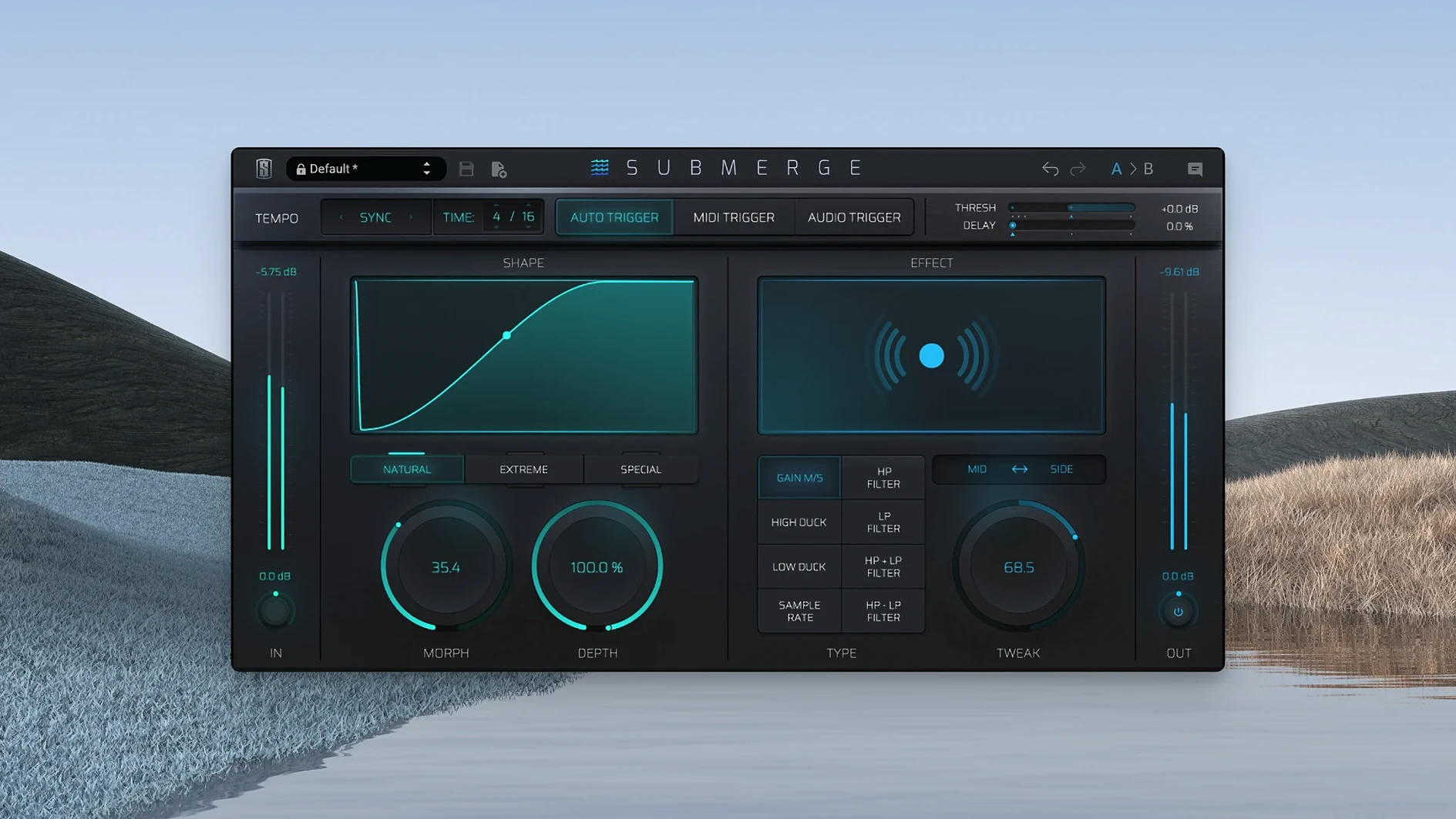
Submerge is for mixers and producers who want sidechain-style ducking and pumping without building complex DAW routing. It sits on a track or bus, listens to the source, and ducks the signal automatically.
Its three trigger modes cover the usual jobs: auto syncs to the project tempo, MIDI reacts to notes, and audio follows an incoming signal. Three curve types — natural, extreme, custom — shape how the duck recovers. Controls like Threshold, Speed, Morph, Depth, and Tweak give you enough range to go from subtle gain rides to obvious pump.
The eight built-in effects include high-pass and low-pass filtering, plus sample-rate reduction. That makes it more than a volume ducker; you can filter or degrade the signal as it ducks, which is useful on pads, bass, or drums.
Submerge installs through Slate Digital's Complete Access Hub or from the installers page. It supports Apple Silicon Macs running macOS 11 or later, and the interface is in English.
Common issues and how to solve them
Most people hit the same few snags within the first hour. The plug-in doesn't respond. The ducking is too fast or too slow. Nothing seems to happen at all.
- No ducking sound. Usually the trigger source isn't set. If you're using auto mode, make sure the project tempo matches what you expect. The auto trigger syncs to the tempo — if the tempo isn't locked or the plug-in isn't reading it, you'll hear a flat signal. Toggle the trigger mode to MIDI or audio and back to force a refresh.
- Ducking starts and stops unpredictably. A common cause is the Threshold control set too high. The signal never crosses it, so the plug-in stays inactive. Lower the Threshold until the yellow indicator shows activity.
- Pumping feels wrong. The Speed control is the culprit. If the duck recovers too fast, it sounds like a stutter. Too slow and it never gets out of the way. Start Speed at 12 o'clock and adjust from there.
- Curve doesn't match the part. Beginners often stick with natural and wonder why it doesn't grab the groove. Try extreme for percussive material, or custom if you want the recovery to follow a specific shape.
A real scenario: sound designer working on a podcast intro
A sound designer builds a 30-second intro for a podcast. The bed is a synth pad, the voiceover is spoken word. They want the pad to duck under the voice and swell back between phrases.
They drop Submerge on the pad track, set the trigger to audio, and route the voiceover track as the side-chain input. Natural curve at first, but the recovery feels too linear for the voice's rhythm. They switch to custom, dial a faster initial recovery, and let the tail stretch out. The eight built-in effects come in handy — they add a low-pass filter on the ducked pad so the voice sits cleaner in the mix. The whole routing takes about thirty seconds. No aux sends, no compressor tweaks, no DAW routing hidden in menus.
Using the Shift invert to turn ducking into pushing
Submerge looks simpler than it is, and that simplicity leads to a few recurring errors.
- Not using the Shift invert. Holding Shift inverts the curve, turning ducking into pushing — the signal swells instead of ducks. Most people discover this by accident or not at all. If your track sounds backward, that's probably why.
- Ignoring the effect section. The eight effects are not decoration. High-pass filtering during a duck can clean up a bass line that would otherwise clash with a kick. Sample-rate reduction on the upward swell gives a lo-fi texture that works on pads or synths. Beginners treat Submerge as a volume automator and miss the creative value of the effects.
- Overusing auto mode. Auto mode is convenient, but it only works well when the source follows the tempo grid strictly. If your performance has swing, tempo changes, or rubato sections, auto mode fights the feel. Switch to audio or MIDI trigger in those cases.
- Setting Depth too high. Full depth kills the signal entirely in the quiet moments. That might be the goal for a hard pump, but most mixes benefit from a few dB of ducking, not silence.
Stability improvements for newer macOS builds
The current version, 1.0.5, is a maintenance release. There are no new effects, no additional curve types, and no interface redesign. The core behavior is identical to 1.0.4. The release addresses stability and compatibility with newer macOS builds. If you were on an earlier version and experienced intermittent crashes when switching between trigger modes, that's resolved. The plug-in also loads slightly faster on Apple Silicon Macs running macOS 14 and 15, though the difference is measured in seconds, not critically affecting workflow.
For anyone looking to find the slate digital crack mac or slate digital mac torrent, understand that the installer through the Complete Access Hub remains the intended method. The 1.0.5 build doesn't change the activation system, and no new features were added that would make an older cracked version preferable.
- macOS 11 or later
- Apple Silicon
Questions from the notes
What trigger modes does Submerge offer?
Submerge has three trigger modes: auto, which syncs to the project tempo, MIDI, which reacts to MIDI notes, and audio, which follows an incoming audio signal.
What effects are included in Submerge?
It includes eight built-in effects, such as high-pass and low-pass filtering, and sample-rate reduction.
What are the curve types in Submerge?
There are three curve types: natural, extreme, and custom, which shape how the ducking behaves.
Install procedure
- Run the standard installer for macOS.
Reports from players
Sign in or create a tester account to file a report.
No reports filed yet.