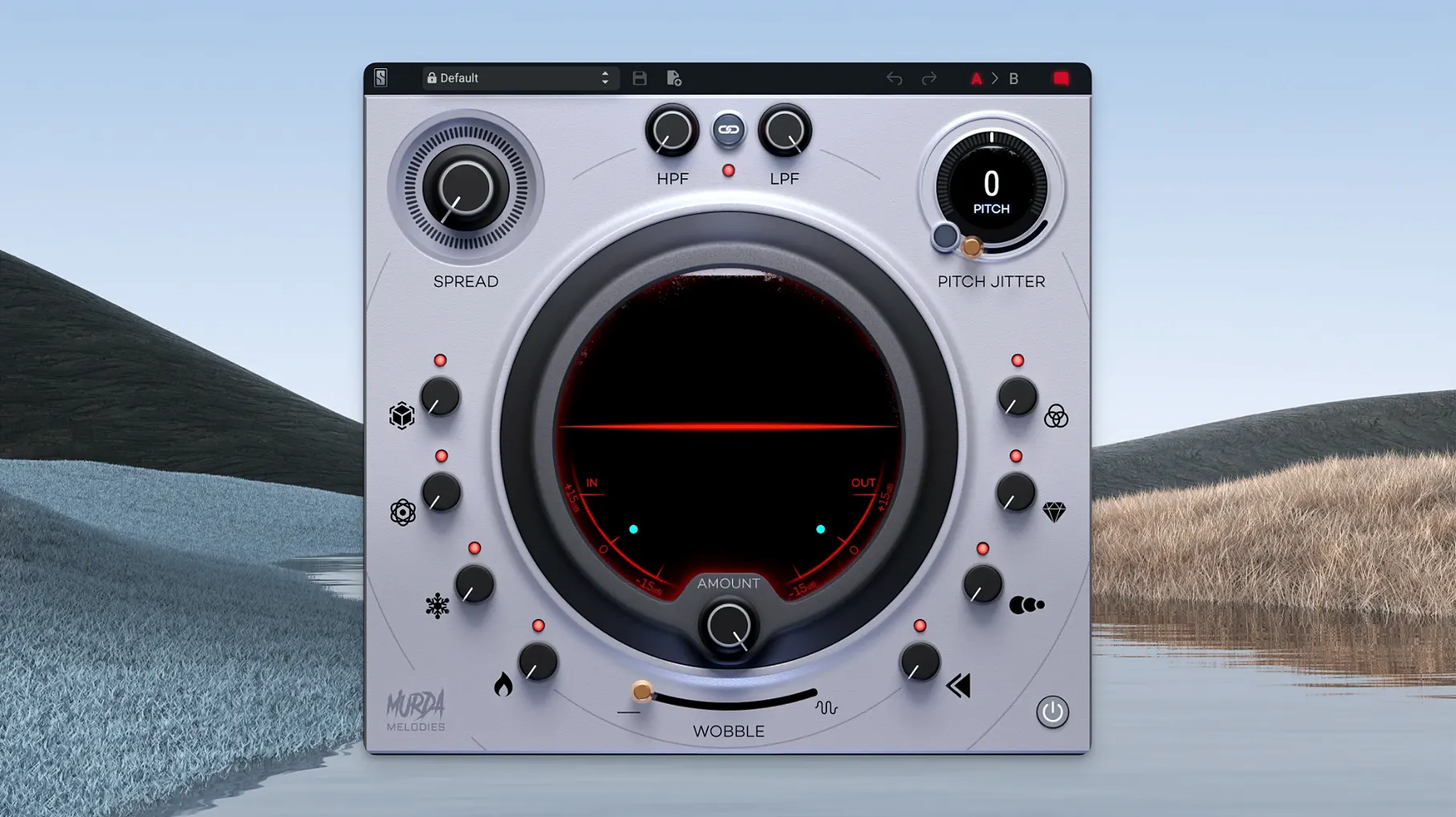
A melody or vocal line that sounds flat after the first loop is a common session problem. Murda Melodies applies eight simultaneous effects—modulation, reverb, synced delays, reverse, pitch shift, filters, and a stereo widener—to keep a part moving without adding more tracks.
Pitch Jitter and 4-octave pitch shifter on a vocal track
Insert it on a lead vocal or ad-lib track. The Pitch Jitter control adds nonlinear artifacts that sound like a hardware glitch, and the 4-octave pitch shifter repositions a line without pitch-correction artifacts. The analog-modeled low-pass and high-pass filters remove sibilance or boxiness before the wet signal hits the output.
Stereo widening and synced delays on an aux bus
Route several melodic elements (synth pads, keys, background vocals) to an aux bus with Murda Melodies. The stereo widener works with mono sources, so a single bus can spread a centered part across the stereo field. Synced delays and reverse processing stay in time with the session tempo, which keeps the bus from drifting out of the mix.
On a master or group
For a whole subgroup (strings, brass, layered pads), the eight effect knobs let you dial in subtle movement per effect without touching individual tracks. Its 50+ presets cover hip-hop, trap, and R&B setups, so you can audition a bus-wide effect and only tweak the wet/dry blend afterward.
Avoid washing out the mix with all eight effects
The most common error is over-processing a single source. With eight effects available, it is tempting to turn every knob halfway up. The result is usually a washed-out signal where pitch shift, wobble, and reverse fight each other. Start with one or two effects—modulation and a filter, for instance—then bring in reverb or delay only if the part still needs movement.
Another frequent slip is ignoring the pitch jitter control. Some users treat it as a simple detune, but it produces nonlinear artifacts that can sound like digital corruption. On a lead vocal or melody, a small amount adds character. Cranked too high, it turns a usable part into noise. Dial it in with the solo button on the track, not in the full mix.
Beginners also forget that the stereo widener is mono-compatible. Inserting it on a mono source and expecting stereo width works, but it can introduce phase issues if the source is already panned. Keep the widener on a bus or on sources that were recorded in mono for the cleanest result.
macOS 11, Apple Silicon, and AU/VST/AAX support
Murda Melodies requires macOS 11 or later and runs on Apple Silicon. It is available in AU, VST, VST3, and AAX formats, so it should load in Logic Pro, Ableton Live, FL Studio, Pro Tools, and most other modern DAWs. The plugin is a single instrument-sized window with eight labeled knobs and a preset browser. No separate installer for standalone operation—it is a plugin only.
Because it is a multi-effects processor, it will use system resources proportional to the number of instances. On a single track the load is light. On multiple bus inserts or several instances across a session, the combined DSP adds up. There is no built-in limiter or compressor, so the wet signal can clip if the pitch shifter or filters push gain unexpectedly. Keep a utility gain plugin after it or lower the output in the mixer.
Solving common glitches and routing issues
Plugin not found after installation
Version 1.0.8 fixed the default installation path. If you still see a missing plugin error in your DAW, check that the installer placed the AU file in /Library/Audio/Plug-Ins/Components/ and the VST3 in /Library/Audio/Plug-Ins/VST3/. Rescan plugins from your DAW's plugin manager.
Presets sound different on Apple Silicon
The presets were designed mostly in Intel-based sessions. On Apple Silicon, the same preset may sound slightly brighter or have a different wet/dry balance due to how the filters and pitch shifter handle the newer architecture. Audition presets and adjust the wet/dry knob or the filters to match your mix.
Mono sources staying mono
If a mono track does not become stereo after engaging the stereo widener, confirm the plugin is in a format that supports mono-to-stereo processing. Version 1.0.8 added that compatibility in AAX and AU formats. If you are using VST3, the plugin may remain in mono mode—switch to AU or create a mono-to-stereo track in your DAW.
The hidden vinyl wobble effect for pad sounds
The vinyl wobble effect is not labeled as such—it is one of the eight effect knobs. It adds a slow pitch fluctuation reminiscent of a warped record. It works well on pad sounds or sustained notes but can sound unnatural on percussive hits.
The analog-modeled high-pass filter can double as a sub-bass cleanup tool on the master bus. Roll it up gently to remove rumble without affecting the low-end punch of kicks and 808s, especially in trap and hip-hop mixes.
For trap producers, Slate Digital Murda Melodies Crack Mac offers presets from Murda Beatz. No additional downloads are needed to access the core sound set.
- macOS 11 or later
- Apple Silicon processor
- English interface language
Questions from the notes
Does Murda Melodies work on Apple Silicon Macs?
Yes. Version 1.0.8 added native Apple Silicon support, and the current version 1.1.1 runs on macOS 11 and later.
What effect controls are available on the plugin?
Eight effect controls cover modulation, reverb, synced delays, reverse processing, a 4-octave pitch shifter, Pitch Jitter for nonlinear artifacts, analog-modeled filters, and a stereo widener compatible with mono sources.
Install procedure
- Run the standard installer for the plugin.
Reports from players
Sign in or create a tester account to file a report.
No reports filed yet.