Steinberg SpectraLayers Pro 13.0.20 — Mac build
VST Plugins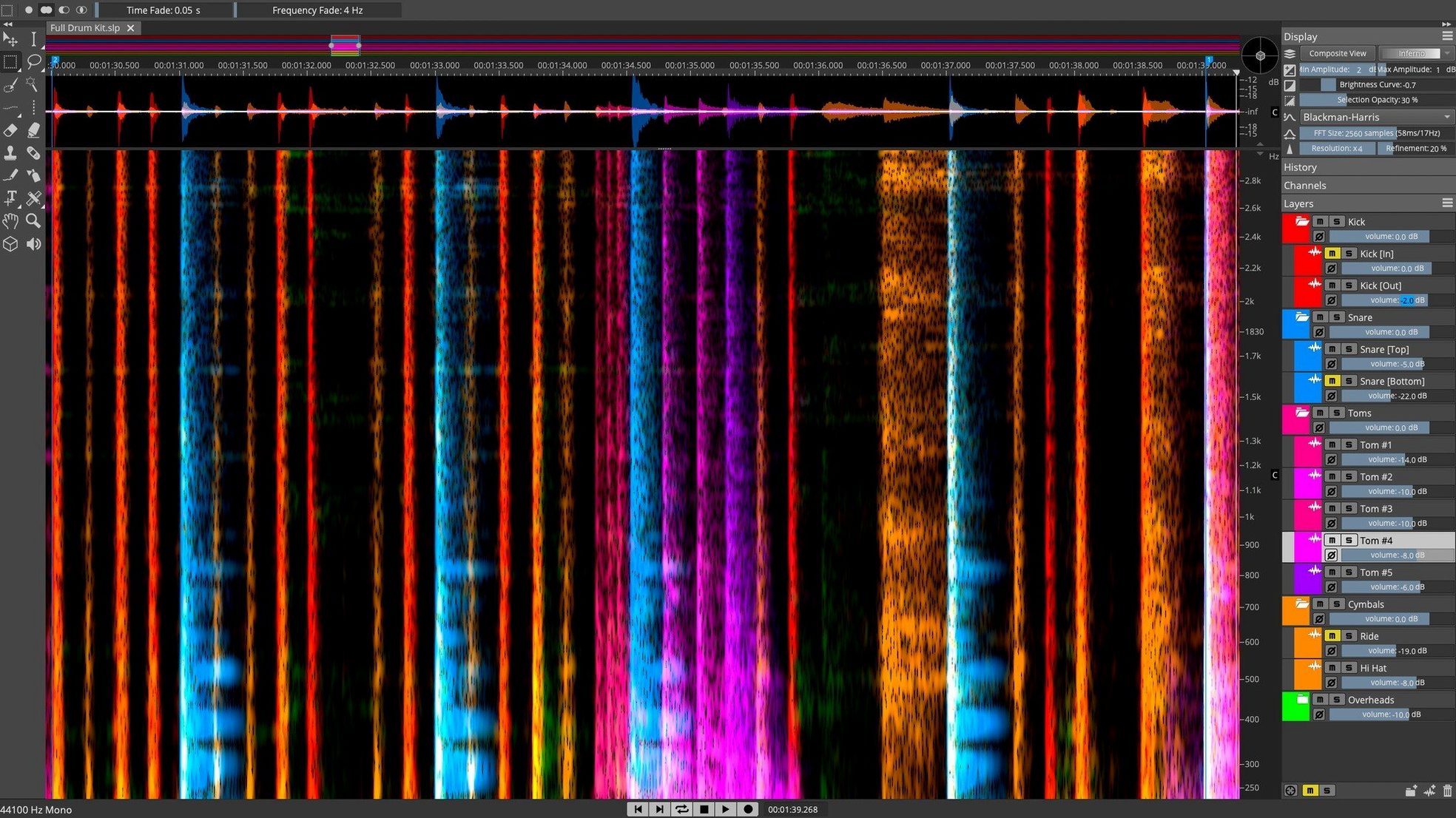
Noisy dialogue, bleed between takes, or unwanted resonances — spectral editing gives you a way to fix them that EQ can't touch. SpectraLayers Pro sits on a track or bus and works directly on the spectrum, letting you see and edit sound as a 3D visual layer.
Remove a cough or separate bleed without bouncing
You use it as an ARA 2 extension inside Nuendo or Cubase, or as a standalone plugin on any channel. Common jobs: removing a cough from a vocal take, separating a guitar amp bleed from a drum room mic, or cleaning up dialog on a film mix.
What tools does it have for everyday fixes?
Manual selection brushes and lasso tools let you paint over noise in the spectrogram. AI-based unmixing separates vocals, drums, bass and other instruments from a single stereo file. The Pattern Finder locates repeated sound events — handy for matching room tone or removing clicks.
Can it handle de-essing and vocal cleanup?
Yes — both automatic and manual de-essing tools are built in. You can select sibilant frequencies directly on the spectrum and attenuate them without affecting the rest of the vocal.
Post-production engineers clean dialogue using a visual noise map
Post-production engineers working on dialogue and ADR spend a lot of time cleaning takes. SpectraLayers Pro gives them a visual map of where noise lives and lets them cut it out without re-recording. Music producers who record bands in a single room also benefit — bleed from one mic into another shows up clearly in the spectrum and can be reduced or removed. Sound designers working with field recordings or sample libraries use the Pattern Finder and unmixing tools to isolate specific sounds from complex backgrounds.
Anyone who regularly exports stems from finished mixes and needs to clean up artifacts from the separation process will find the manual editing tools more useful than relying solely on AI. The combination of automatic unmixing and hand-editing in the same session saves exporting back and forth between apps.
Remove hum and mouth clicks from a two-hour interview track
A podcast editor receives a two-hour interview recorded over a video call. The host's microphone is clean, but the guest's track has a persistent electrical hum and occasional mouth clicks. The editor loads the guest track into SpectraLayers Pro as a standalone process. The Voice Denoiser handles the hum in one pass. Then the editor zooms into the spectrogram, selects the mouth clicks using the lasso tool, and applies attenuation — each click takes about two seconds to find and fix. The processed file exports as a WAV that replaces the original in the DAW session. No re-recording, no EQ that would dull the voice, and no third-party noise gate that misses the quieter clicks.
Stability improvements keep AI unmixing and Pattern Finder unchanged
The installer release notes for 13.0.20 are available directly from Steinberg. The update focuses on stability improvements rather than new features — the AI unmixing algorithms, Pattern Finder, and ARA 2 integration remain the same as the initial 13.0 release. For daily use this means fewer unexpected hangs during spectral selections and more reliable export when working with large files. Users who keep the installer handy for deployment across multiple machines will find the standard disk-image procedure unchanged.
ARA 2 integration applies spectral edits directly to the DAW timeline
ARA 2 integration is the main bridge to a DAW workflow. When you open SpectraLayers Pro from inside Nuendo or Cubase, the spectral edits apply directly to the audio clip on the timeline — no bouncing, no importing. Outside of ARA 2, the app runs as a standalone application that reads and writes common audio file formats. On macOS 12 and later, both Intel and Apple Silicon Macs run the same installer, so a team with mixed hardware can use identical builds. The 3D spectrogram view is independent of the system GPU driver — it renders consistently across integrated and discrete graphics.
The app works alongside other spectral tools and restoration plugins without conflict. You might use iZotope RX for batch processing and SpectraLayers Pro for the jobs that need manual selection, then export the cleaned audio back into Logic Pro or Pro Tools. The file format support is standard enough that no conversion step is needed between apps.
- macOS 12 or later
- Intel or Apple Silicon processor
- Interface language: English
Questions from the notes
Does SpectraLayers Pro support Apple Silicon natively?
Yes, version 13.0.20 runs natively on both Intel and Apple Silicon Macs. macOS 12 or later is required.
What editions are available?
SpectraLayers is offered in Pro and Elements editions. Pro includes the full toolset including AI unmixing and ARA 2 integration.
Install procedure
- Open the downloaded disk image.
- Run the standard installer procedure.
Reports from players
Sign in or create a tester account to file a report.
No reports filed yet.