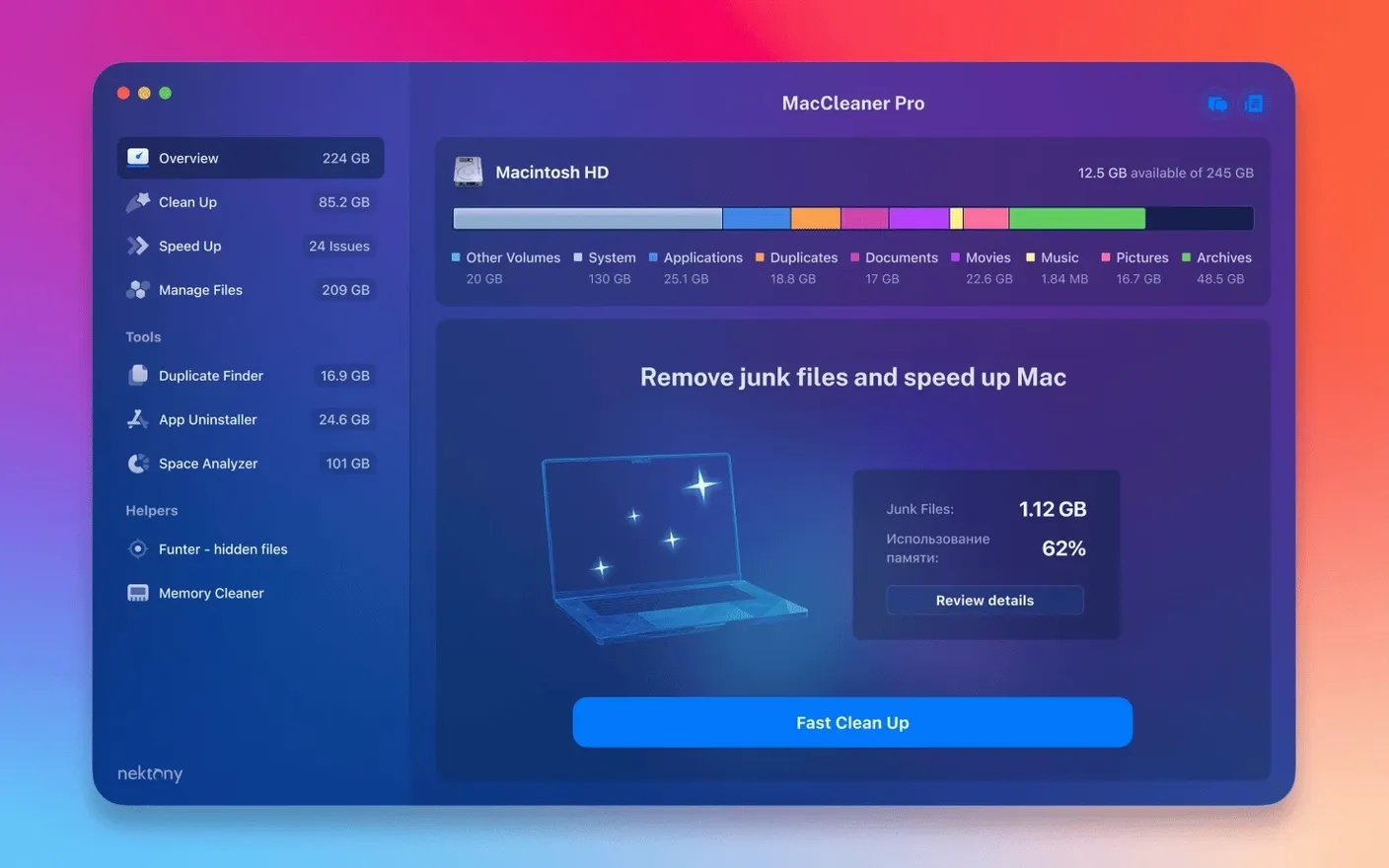
Running out of disk space on a Mac usually starts with a warning that the startup disk is full. MacCleaner Pro 4.0.2 is a bundle of six utilities meant to prevent that situation and keep storage under control. It packages MacCleaner Pro, App Cleaner & Uninstaller, Disk Space Analyzer, Duplicate File Finder PRO, Memory Cleaner, and Funter into one installer. The suite handles the common cleanup tasks: scanning for large and old files, finding duplicate folders, uninstalling applications along with their leftover service files, and clearing inactive RAM. The latest update improves detection of items stored in an iCloud folder and in a custom Home folder, and fixes several minor interface issues. It runs on macOS 10.13 and later, supports both Intel and Apple Silicon Macs. For someone who wants a single download instead of hunting down separate tools for each cleanup job, this bundle covers the basics.
MacCleaner Pro hunts leftover preferences with App Cleaner & Uninstaller
| Item | Value |
|---|---|
| Version | 4.0.2 (May 2026) |
| Developer | Nektony |
| macOS support | 10.13 or later |
| Architecture | Intel 64-bit, Apple Silicon |
| Languages | English |
The suite is built around the idea that freeing space requires more than just emptying the Trash. App Cleaner & Uninstaller 9.0.3 hunts down leftover preferences, caches, and support files that standard deletion leaves behind. Duplicate File Finder 8.5.2 scans for exact copies of files and folders. Memory Cleaner 5.5 monitors RAM usage and can purge inactive memory. Disk Space Analyzer 6.0 gives a visual breakdown of what is using storage. Funter 7.1 shows hidden files in Finder. MacCleaner Pro itself coordinates these tools and adds its own cleaning routines for system caches, logs, and downloads. It is a practical collection for users who want to recover disk space without jumping between different apps.
A typical scenario: a designer's storage crunch
After a year of client projects, the machine shows a startup disk warning every few days. The designer's workflow involves large Photoshop and Illustrator files, exported PNGs, and font packs that accumulate in the Downloads folder. The designer does not need to learn six separate tools — the suite's main interface shows each module, and clicking one opens the relevant utility. For someone managing multiple client deliveries, the bundle provides a repeatable cleanup routine without guesswork.
Running every module at once can cause confusion
New users often assume that running every module at once is the fastest way to clean the system. That approach can cause confusion: Memory Cleaner clears inactive RAM, but if Disk Space Analyzer is scanning at the same time, the memory tool might show less available RAM than expected because the analyzer is working. Running them one at a time gives clearer results.
Another mistake is deleting system cache files without checking what they belong to. MacCleaner Pro lists items by category, but a beginner might remove all Safari cache entries, then wonder why some websites reload slowly. Reviewing each category before cleaning prevents unnecessary browser slowdowns.
Beginners also tend to skip the review step when using Duplicate File Finder. The tool shows duplicate files for confirmation before deletion, but some users approve everything in bulk without checking whether they need both copies in different locations. A designer might delete a duplicate font file that was actually a different version, breaking an InDesign project. Always preview the duplicates list before confirming removal.
Finally, new users sometimes forget to empty the Trash after running the cleaner. MacCleaner Pro moves deleted items to the Trash by default, so the freed space does not appear until the Trash is emptied. The first cleanup session should include a manual Trash check.
A writer starts with Disk Space Analyzer, then App Cleaner & Uninstaller
Imagine a writer who uses the Mac for both work and personal files. The writer opens MacCleaner Pro and starts with Disk Space Analyzer.
Next, the writer opens App Cleaner & Uninstaller. It lists every installed application and its leftovers. The writer removes three games that were installed for a weekend test and never played again. The uninstaller removes the game files and also deletes their config files and saved data from the hidden Library folder.
Then Duplicate File Finder scans the Documents and Desktop folders. It finds 400 duplicate PDFs — mostly invoices and receipts that were saved to both the Desktop and a project folder. The writer reviews the list, keeps one copy of each in the project folder, and deletes the desktop copies. Another 2 GB reclaimed.
Finally, the writer uses MacCleaner Pro's system cleaning module to clear browser cache and log files. The startup disk warning disappears. The session took about 20 minutes total, with most of that time spent in review steps.
Run Disk Space Analyzer first for a visual storage map
After installing MacCleaner Pro, run Disk Space Analyzer first. It gives a visual map of storage use, so you know which folders are worth targeting. Without that overview, cleaning is guesswork.
Use Duplicate File Finder on one folder at a time during the first week. Running it on the entire drive can return thousands of results, which takes time to review. Starting with the Desktop and Downloads folders gives a manageable list and quick wins in freed space.
Keep a note of which apps you uninstall with App Cleaner & Uninstaller. The tool does not track uninstall history beyond its own session logs, so a simple text file saves time later.
Leave Memory Cleaner for the end of a session. Clear files and duplicates first, then run Memory Cleaner to clear inactive RAM after the system has started fresh. That sequence gives the most noticeable speed improvement.
MacCleaner Pro frees up disk space by removing junk files, but "mac cleaner pro torrent" may deliver outdated versions. If you find a download labeled as MacCleaner Pro, check that the included utilities match the version numbers listed in this article. The suite changes between releases, and a mismatched version might lack a tool you expect. The same applies to maccleaner 4 pro and maccleaner pro crack files — they often omit the latest fixes, such as the improved iCloud folder detection in 4.0.2. If you search for a mac cleaner torrent, the package should include all six apps at their current versions. A missing utility means the bundle is incomplete.
- Improved detection of items stored in an iCloud folder.
- Enhanced detection of items in a custom Home folder.
- Fixed several minor interface issues.
- macOS 10.13 or later
- Intel or Apple Silicon Mac
Questions from the notes
Does MacCleaner Pro work on Apple Silicon Macs?
Yes, it supports both Intel 64-bit and Apple Silicon Macs.
What is included in the MacCleaner Pro bundle?
It includes six apps: MacCleaner Pro 4.0.2, App Cleaner & Uninstaller 9.0.3, Disk Space Analyzer 6.0, Duplicate File Finder 8.5.2, Funter 7.1, and Memory Cleaner 5.5.
What was improved in version 4.0.2?
The update improved detection of items stored in an iCloud folder and in a custom Home folder, and fixed several minor interface issues.
Install procedure
- Open the included installer package.
- Follow the included installation instructions.
- Complete activation using the instructions included in the package.
Reports from players
Sign in or create a tester account to file a report.
No reports filed yet.