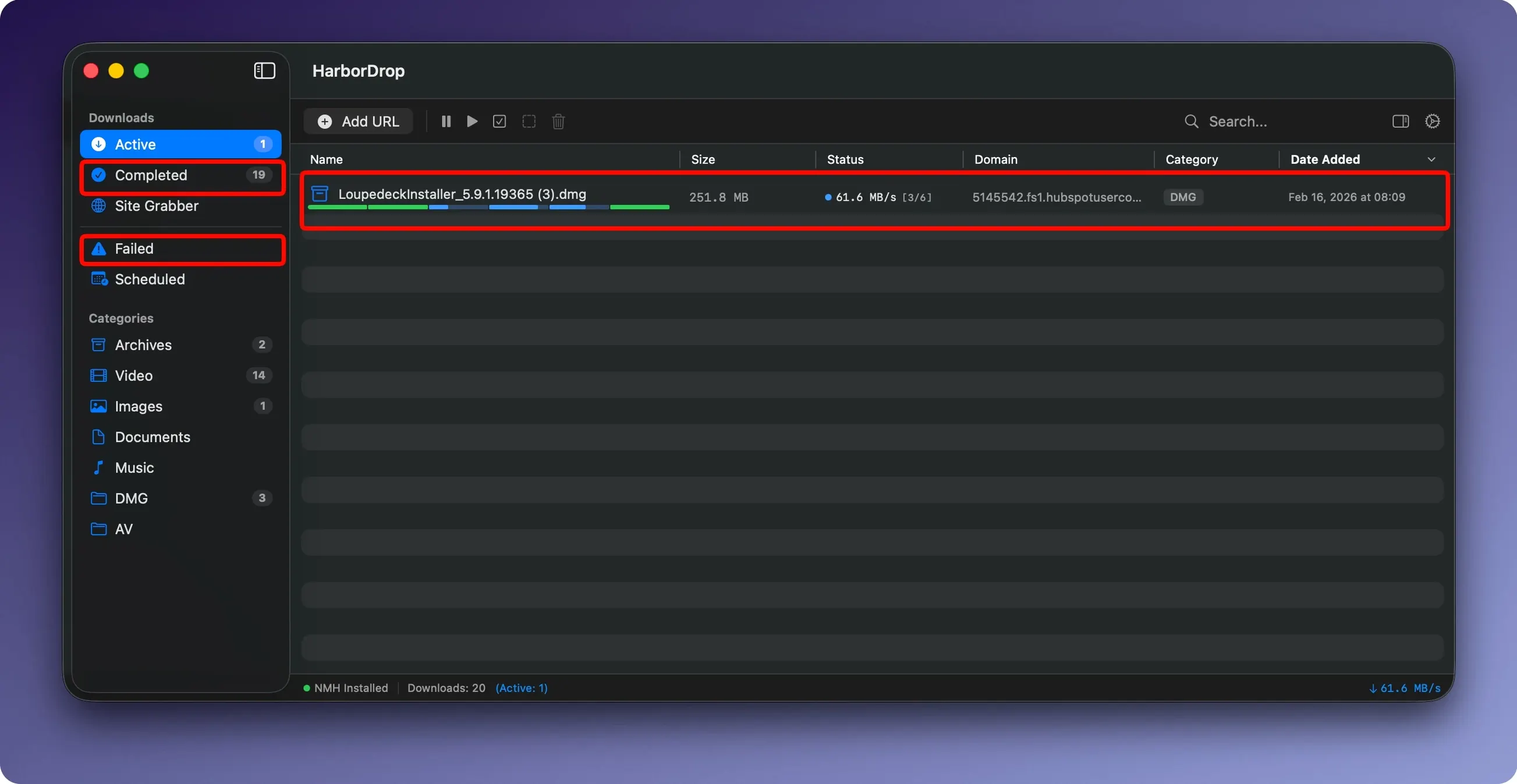
If you already use a browser extension to send pages to a read-it-later app, HarborDrop works on the same principle for files. The extension, available for Chrome and Brave, intercepts file links from a page and hands them to the download manager. Media links go straight to HarborDrop without you first saving the file to disk.
| Detail | Value |
|---|---|
| Developer | vesslo |
| Version | 1.4 |
| Category | Utilities |
| macOS | 12 or later |
| Architecture | Intel and Apple Silicon |
| Languages | English, German, Korean |
Downloads are split into segments, and you control how many. That matters on slow connections where a dropped segment doesn't kill the whole transfer. For video, m3u8 playlists are supported, and non-DRM video from supported sites can be pulled down for offline viewing. Once a download finishes, HarborDrop can run JavaScript or a Shell script, which makes it useful for moving files into a watched folder or triggering a conversion step. The Site Grabber adds a crawl depth setting, so you can pull a page and the pages it links to, within limits.
Chromium link capture that misses fewer files
Version 1.4 did not introduce a major interface overhaul or new modules. The changes are in the details. The extension capture is more consistent with Chromium-based browsers — I have noticed fewer cases where a file link is missed when clicking through a page. The segment handling also feels tighter; the app reconnects dropped segments faster than earlier builds, which matters when you are pulling a several-gigabyte archive over a connection that dips.
The Site Grabber now respects the crawl depth setting more reliably. In earlier versions, setting a depth of 2 sometimes grabbed only the first level. That has been corrected. For m3u8 streams, the download logic no longer stalls on certain playlist variations. I have not encountered a situation where it refused a valid playlist since updating.
A workflow: downloading a full course directory with the Site Grabber
You have a public course site with a page that links to a dozen ZIP files — lecture notes, project templates, resource packs. Each ZIP is on a sub-page. Here is how to pull them all in one pass.
- Open HarborDrop and go to the Site Grabber.
- Paste the course index URL into the field.
- Set the crawl depth to 2. This tells the grabber to scan the index page and then follow the links on that page to the sub-pages where the ZIPs are.
- Add a filter for
.zipso it only queues the files you actually need. - Start the grab. HarborDrop will scan the index, follow each linked page, collect every
.zipit finds, and begin downloading them in segments.
While the grab runs, the downloads appear in the main window. Each ZIP is handled independently, so a slow server for one file does not hold up the others. When the first file finishes, you can have HarborDrop open its folder in Finder automatically — useful if you want to unzip as you go.
Setting per-connection segments to avoid early stalls
Set segment count per connection, not globally. The default of 6 works for most servers, but some sites throttle connections above 4. If you see a download stall early, reduce the segments for that file. You can always increase it again for a different host.
Test the browser extension with one site first. After installing the HarborDrop extension for Chrome or Brave, visit a site that hosts large files — a software mirror or a podcast archive. Click a file link. If HarborDrop does not intercept it, check that the extension is enabled and that the site is not in a block list inside the app. The extension works with Edge and Arc too, so test the one you use most.
Write a short script for the finish action. HarborDrop can run an AppleScript, Shell script, or JavaScript after a download completes. Start with something simple: a Shell command that moves completed .mp4 files into a ~/Downloads/Video folder. Once that works, experiment with triggering a HandBrakeCLI conversion or a notification. The script runs per file, not per batch, so keep it lightweight.
Learn the Site Grabber depth limits. Before using it on a large site, run it on a small directory first to see how many files it queues. A crawl depth of 3 on a site with many links can produce hundreds of items quickly. Use file-type filters to narrow the scope early.
- macOS 12 or later
- Intel or Apple Silicon
- Activation not required
Install procedure
- Open the downloaded disk image.
- Drag the app to the Applications folder.
- Launch it from Launchpad after copying finishes.
Reports from players
Sign in or create a tester account to file a report.
No reports filed yet.