You queue a large file in Folx Pro, switch to another task, and come back to find the download stalled. With version 5.34, that scenario is less common: the update improved torrent handling and fixed a crash when adding magnet links. If Folx is not downloading on Mac, the first thing to check is the proxy settings — the latest release also improved functionality with an enabled proxy.
- Split downloads into up to 20 threads for faster direct downloads.
- Use the built-in torrent search and sort results by number of seeds to pick the healthiest files.
- Rename output files when downloading YouTube videos.
- Schedule downloads for later to run during off-peak hours.
- Handle both direct downloads and torrents, including magnet links, in one app.
- Choose from ten interface languages, including English, Russian, German, and Spanish.
For a download manager that covers both direct links and torrents, Folx Pro does the job. The 5.34 changes address several long-standing annoyances, and the proxy improvements matter if you route traffic through a VPN or a filter. If you hit a stall, verify your proxy and torrent settings first — that’s where most issues live.
Folx Pro picks up URLs from your clipboard
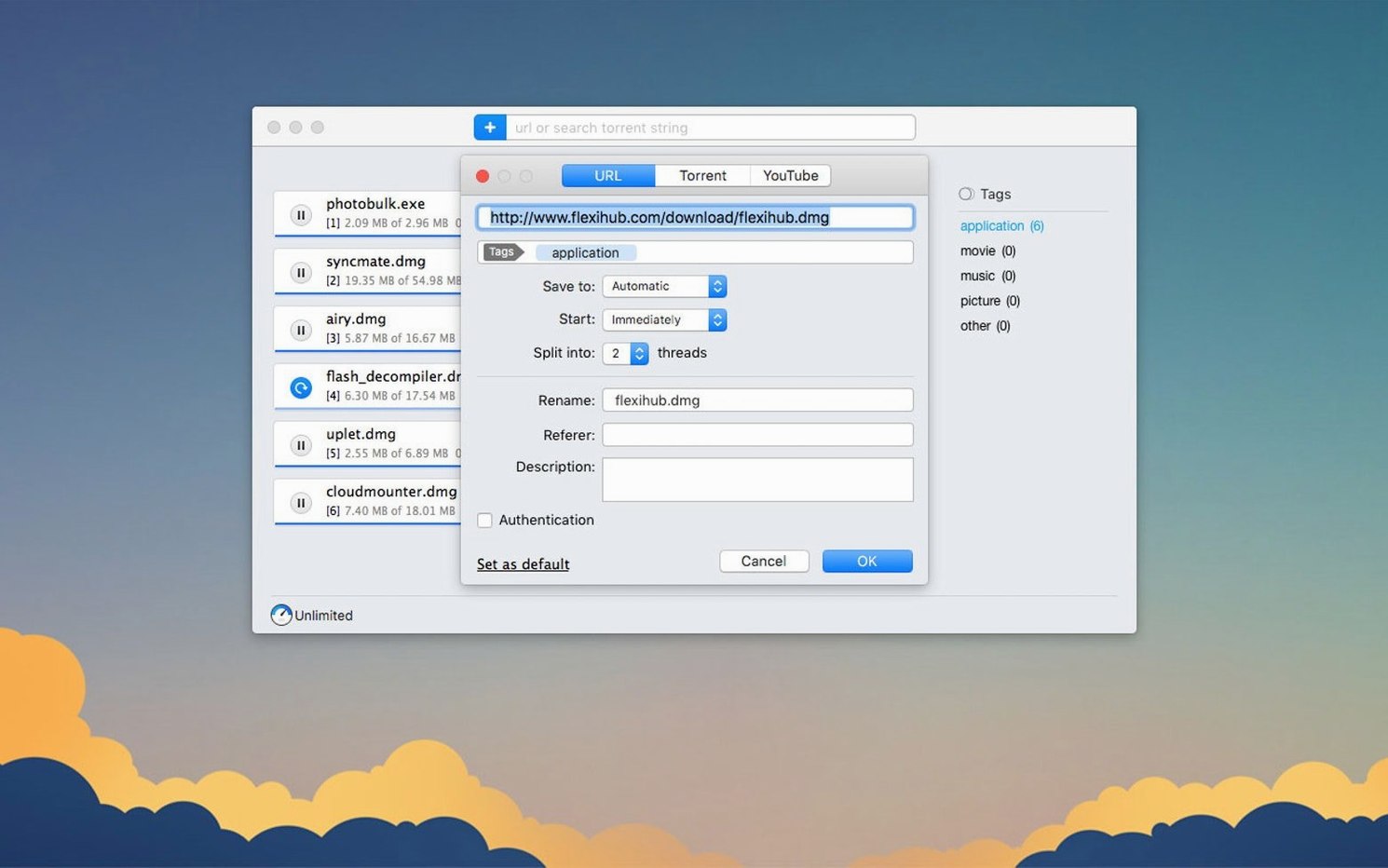
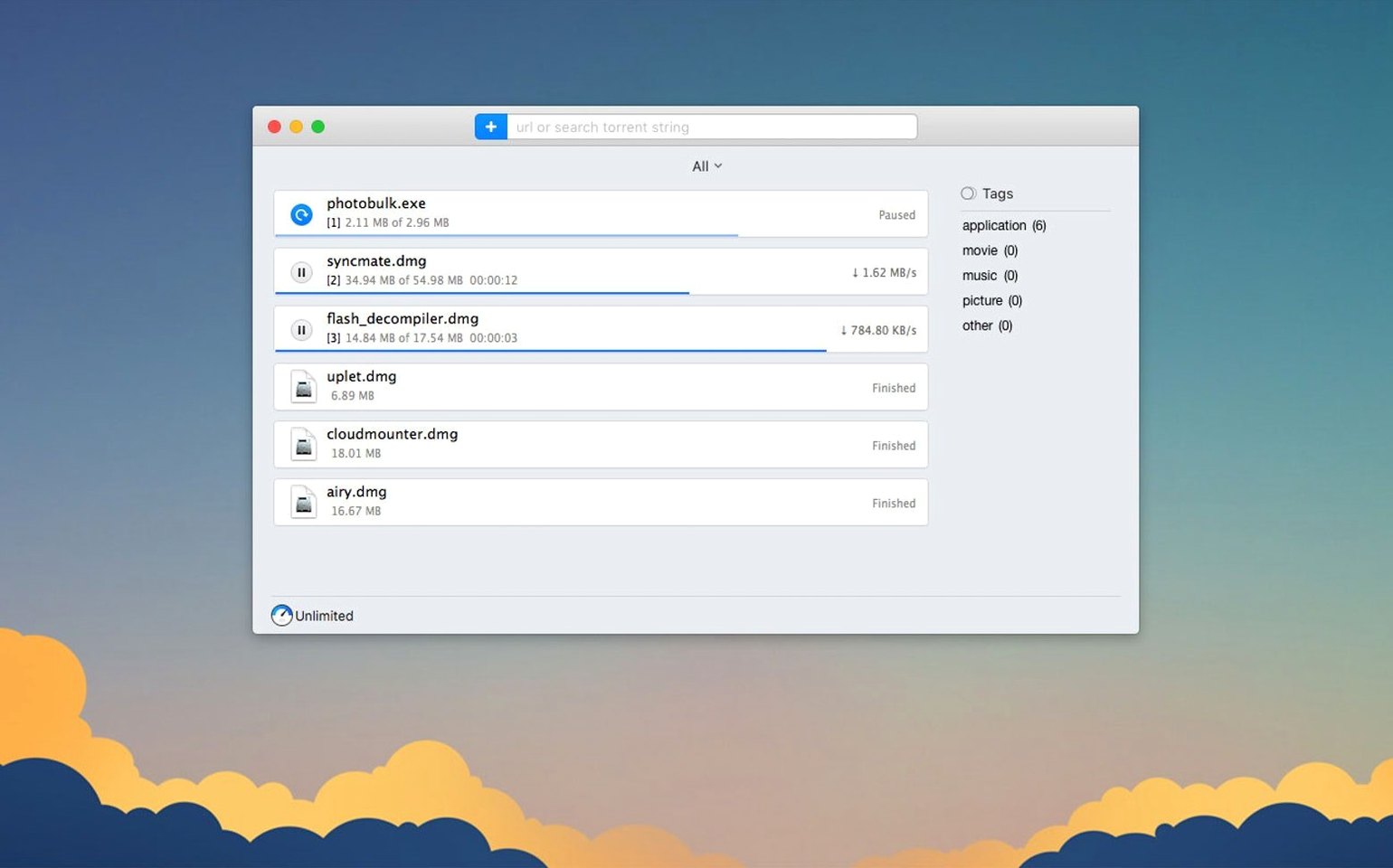
You open Folx Pro and the main window shows a clean list of active downloads. To start a direct download, you copy a URL from your browser, and Folx Pro picks it up automatically if the clipboard monitor is on. The download splits into threads — you set the number in preferences, up to 20 — and the progress bars update as each piece comes in. For a large ISO or archive, this cuts the wait noticeably compared to a single-threaded browser download.
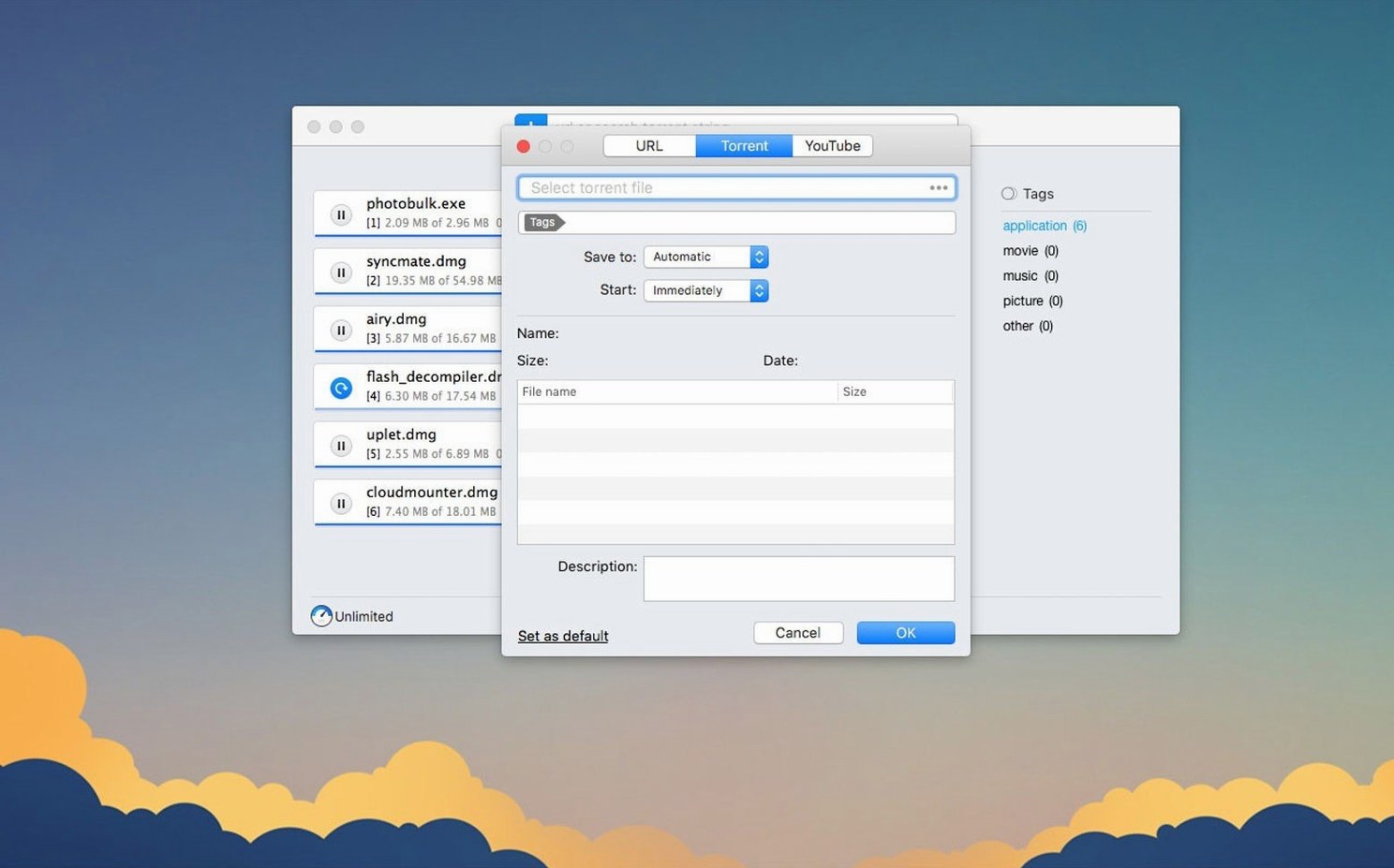
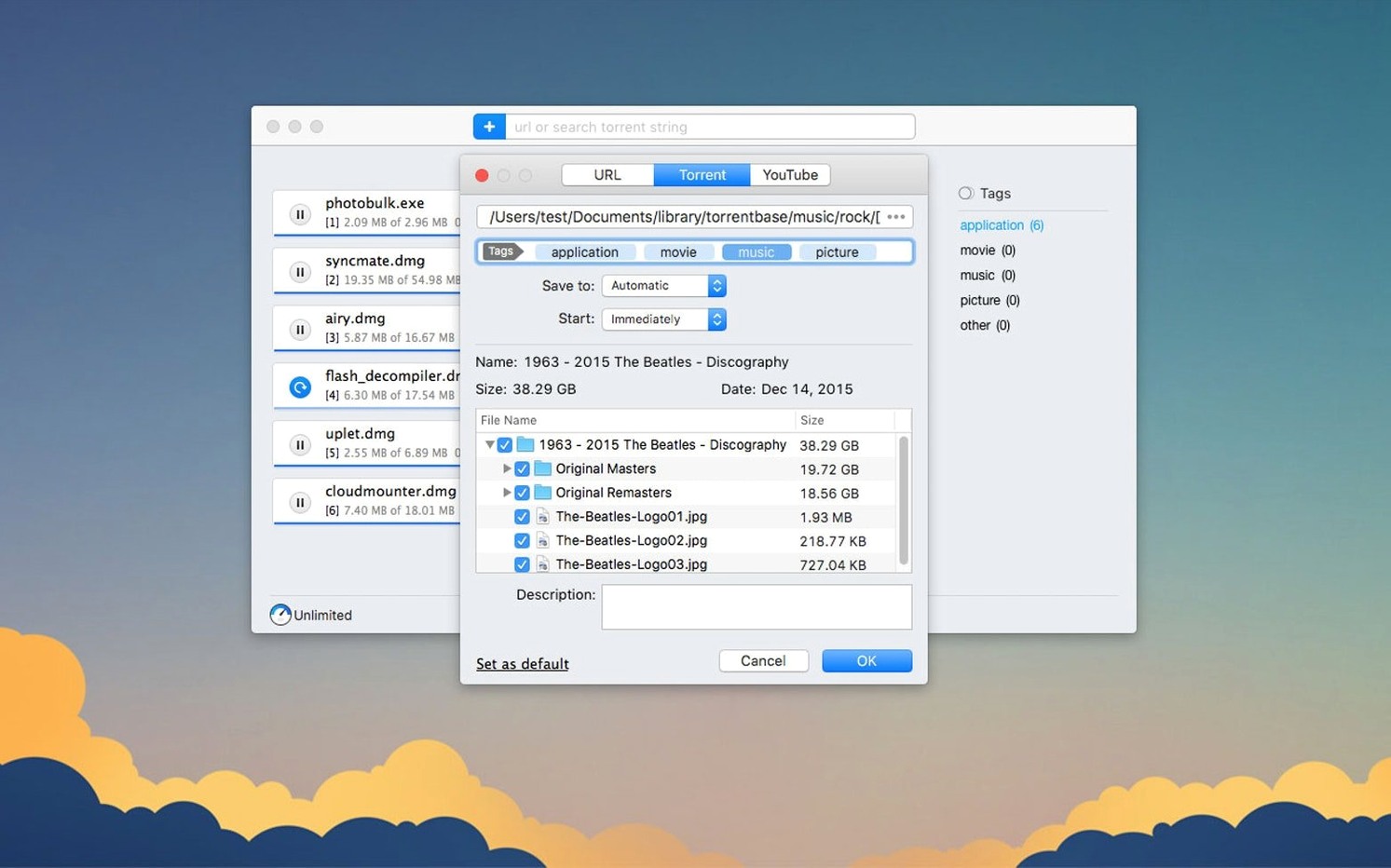
When you need a torrent, you either drag a .torrent file into the window or paste a magnet link. The app parses the tracker list and starts fetching metadata. In version 5.34, adding some magnet links no longer crashes the app, so that step is now reliable. Once the metadata arrives, you see the file list and can uncheck anything you do not want — selective downloading within torrents works better in this release.
For YouTube videos, you paste the page URL into the dedicated downloader. A popup shows the available formats and quality options. You pick one, rename the output file if the default title is too long, and start the download. The app handles the rest, including any format negotiation.
If you prefer to run downloads later, you set a schedule: a specific time, or a countdown from the current moment. The queue sits in the scheduler tab until the clock triggers it. This is useful if you want downloads to happen after your work hours, or when you know the network will be less congested.
After each download finishes, the entry moves to the completed list. You can search through your history by filename or URL, which helps when you downloaded something days ago and need to find it again.
Stored passwords save you from re-entering credentials
Folx Pro remembers logins and passwords for sites that require authorization. Once you enter credentials for a protected download area, the app stores them and reuses them on subsequent downloads from the same site. No need to re-enter each time.
When you search torrents from within the app, the results display the seed and peer counts. You can sort by seeds to pick the most active torrent first. This is a quick quality check before you commit to a download.
For YouTube downloads, you can choose the save quality when multiple options exist. The list shows the resolution and format, so you can pick 1080p over 720p, or a smaller file size if that matters. The rename field is right there, so you can correct awkward video titles before the file lands on your disk.
Folx Pro also handles magnet links without a separate torrent client. If another app does not respond to a magnet link, you can copy it and paste it directly into Folx Pro. Version 5.34 fixed a crash when adding some magnet links, so that path is now more stable.
Folx Pro handles direct downloads better than uTorrent
On macOS, the main alternatives for download management are uTorrent, Transmission, and Folx Pro. uTorrent handles torrents well and is widely known, but it focuses mostly on torrents — direct downloads are not its primary use. Transmission is a lightweight torrent-only client with a simple interface, no direct download support, and no YouTube downloader. Folx Pro covers all three: direct downloads with thread splitting, torrents with search and magnet links, and YouTube video downloads in one application. If you regularly deal with all three types, Folx Pro saves you the trouble of running separate tools.
For users who prefer a more minimal torrent-only approach, Transmission remains a solid choice. But if you want scheduling, thread splitting, and credential storage alongside torrent support, Folx Pro offers those extra tools without requiring a second app.
Check proxy settings right after installation
Right after installation, open the preferences and check the proxy settings. The 5.34 improvements in this area mean that if you use a proxy or a VPN, the app should work correctly — but only if the proxy is configured properly. If you hit stalls, toggle the proxy off and on in preferences to rule out a misconfiguration.
Set your default download folder early. Folx Pro uses a default location, but you can change it to a dedicated folder on your main drive or an external disk. This prevents your Downloads folder from becoming a pile of mixed files.
If you download torrents often, enable the torrent search feature and use the seed-sorting function. It helps you avoid slow or dead torrents right from the start.
For YouTube downloads, test one or two videos at different quality levels to see how the app handles them. Some channels use unusual format combinations — if the download fails, try a lower quality setting to confirm compatibility.
Finally, if you run into a situation where folx not downloading on Mac, the first step is to check the proxy and torrent settings. The 5.34 fixes and improvements address the common causes, so a quick settings review usually resolves it. Folx Pro manages downloads with a built-in scheduler, ideal for users needing organized file transfers on macOS.
- Improved torrent downloading.
- Improved handling and storage of downloaded torrent tasks.
- Improved functionality with enabled proxy.
- Improved selective file downloading within torrents.
- Fixed a crash when adding some magnet links.
- Fixed a crash during torrent search.
- Changed minimum macOS requirement to 10.13 or later.
- macOS 10.13 or later
- Intel or Apple Silicon
Questions from the notes
Why is Folx not downloading on Mac?
Check your proxy settings first — version 5.34 improved functionality when a proxy is enabled. Also verify the torrent has enough seeds and that the download is not scheduled for later.
What's new in Folx Pro 5.34?
It improves torrent downloading, handling of downloaded torrent tasks, selective file downloading within torrents, and proxy behavior. It also fixes crashes with some magnet links and during torrent search.
Install procedure
- Mount the downloaded disk image.
- Drag the app to the Applications folder alias.
- After copying finishes, open the app from Launchpad.
Reports from players
Sign in or create a tester account to file a report.
No reports filed yet.