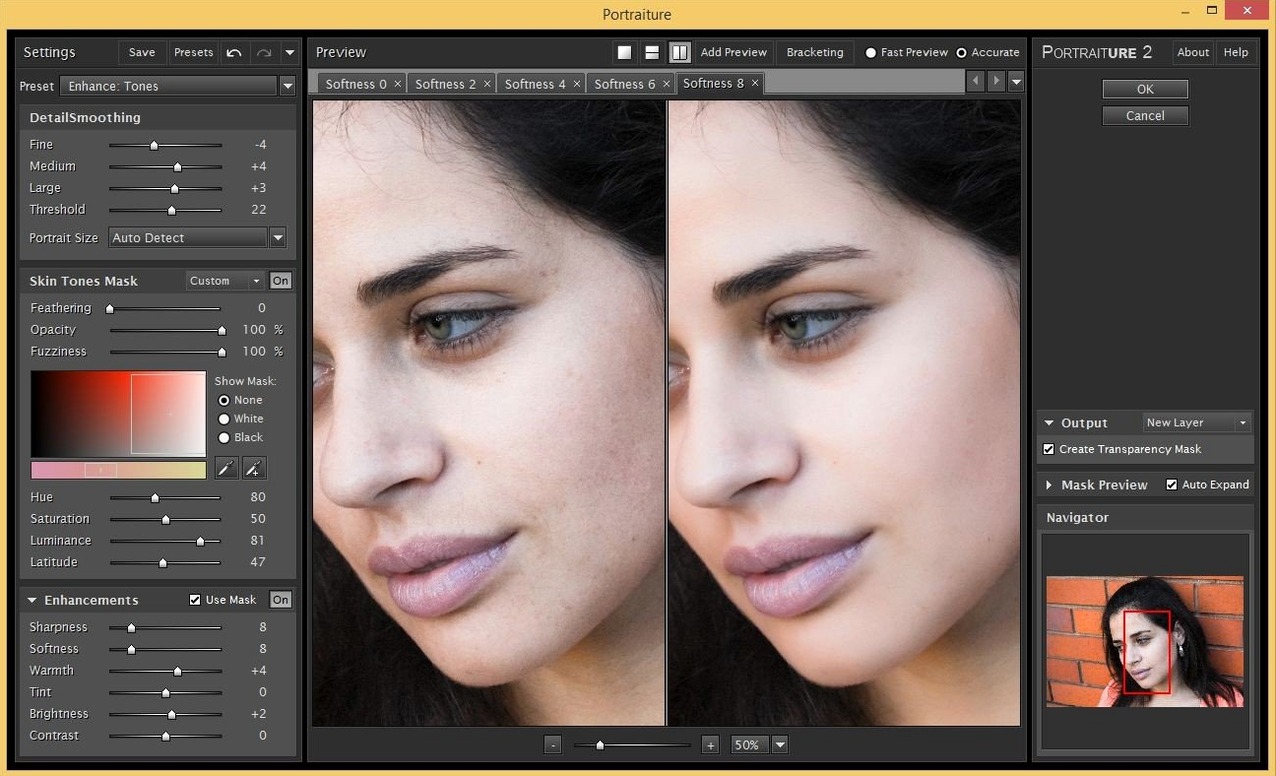
Portraiture 4.5 Build 4501 automates the tedious part of skin retouching: instead of painting masks by hand, it detects skin tones and applies smoothing only where you want it. The interface is English, and the current AI smoothing engine is a next-generation version. It works as a plugin for Photoshop, Lightroom Classic, and Affinity on macOS 13 and later, supporting both ARM and x86_64 systems. Controls are straightforward: you dial in the amount of smoothing, adjust the mask threshold to protect high-detail areas like eyes and hair, and tweak the fineness and strength to match the subject’s skin texture. The result is a natural finish that keeps pores and detail where they matter. The host list covers Photoshop, Lightroom Classic, and Affinity, making it a flexible tool for any portrait workflow on Mac.
Run the filter with default settings first
When you first load Portraiture 4.5 as a plugin, open a portrait image and run the filter with its default settings. This gives you a baseline — you see what the AI smoothing engine picks as skin and how much it smooths. From there, back off the smoothing amount by about half and check the mask overlay. The overlay shows you exactly which areas the plugin is treating; if it catches clothing or background texture, raise the Mask Threshold slightly until those areas drop out. After a few images you will get a feel for the balance between Smoothing and Detail that works for your usual subject matter.
It is worth running the plugin on a duplicate layer or a smart object in Photoshop. That way you can mask out the effect on eyes, brows, or lips using a layer mask after the plugin finishes. The plugin itself does not apply a mask you can edit — it outputs a fully processed layer — so the smart object workflow lets you dial back the effect in specific spots without re-running the whole operation.
Next-generation AI smoothing engine cleans up skin edges
The jump to 4.5 Build 4501 brought the next-generation AI smoothing engine. In practice that means the plugin now distinguishes skin regions more cleanly from non-skin areas like hair, clothing, and background patterns. Earlier versions could smear eyelashes or soften jacket seams if the Mask Threshold was set low; the current engine holds those boundaries better at similar threshold values. The result is less time checking the mask overlay and fewer adjustments between runs.
Compatibility with Affinity Photo is new for this version line as well. If you work mostly in Affinity, you now get the same one-click skin detection and smoothing that Photoshop users have had. The Affinity plugin installs separately from the Photoshop build, so download the correct package for your host app.
Plugin remembers your last slider settings per session
- The plugin remembers the last settings you used when you reopen it in the same session. If you settled on a preset for a specific lighting condition, you do not need to reset sliders for each image in that batch.
- Mask Threshold has a preview mode. Toggle it on and the view switches to black-and-white: white areas are where smoothing will apply, black areas are untouched. This is faster than running the filter and undoing it to check.
- The plugin works on 16-bit and 8-bit images in Photoshop. If you edit in 16-bit for color depth, Portraiture processes at that depth without an intermediate 8-bit conversion.
Cuts retouching time from minutes to thirty seconds per image
Portrait photographers who shoot tethered or import large batches of headshots benefit most. The plugin reduces each retouching pass from several minutes of manual masking to about thirty seconds of slider adjustments. That difference matters when you have fifty or a hundred similar images to process. Wedding photographers, school portrait studios, and event shooters are the typical audience.
Beauty and fashion retouchers who need a natural finish also get value from the Detail and Smoothing sliders: you can retain skin texture while reducing uneven patches, which is harder to do by hand without creating a plastic look. Hobbyist photographers who edit a few portraits per month will find it useful too, though the learning curve for the mask controls is shorter if you already know how Photoshop layer masks work.
Users on Apple Silicon Macs are covered — the plugin runs natively on ARM, so no Rosetta translation, which avoids the occasional compatibility hiccup that older plugins had on M-series machines.
Installation and compatibility questions answered
Does it work with Lightroom Classic as a separate plugin?
Yes. Imagenomic distributes a separate installer for Lightroom Classic. The plugin appears in the File > Plug-in Extras menu after installation, not as a filter in the Develop module. You edit the image in the Library or Develop module, then run Portraiture from that menu, and the processed result opens as a new TIFF or PSD file in your Lightroom catalog.
Designed for skin, not landscapes or objects
The plugin is designed for skin. If you run it on a landscape or an object, the AI engine may not detect anything to smooth, or it may produce unpredictable results on surfaces it mistakes for skin. Stick to portraits for reliable output.
Works on JPEGs, RAWs, and TIFFs with equal quality
It processes whatever pixel layer you send it, regardless of whether the source is a RAW conversion, a JPEG, or a TIFF. The quality of the result depends more on the exposure and sharpness of the original than on the file format. For best results, do your color and exposure corrections before running the plugin.
Runs a single pass on Intel or Apple Silicon Macs
The AI smoothing engine does require a bit of computation, but it runs in a single pass. On a Mac that meets the minimum requirements (macOS 13 or later, on either Intel or Apple Silicon), the plugin processes a 24-megapixel image in a few seconds. Very large files, such as stitched panoramas or 100-megapixel medium-format captures, take longer but the interface remains responsive during processing.
Can I undo the effect after closing Photoshop?
The plugin modifies the active layer in your document. If you applied it directly to the background layer and saved, you cannot undo it later. Working on a duplicate layer or a smart object gives you the flexibility to revisit the effect in a later editing session.
- Build 4501 ships with a next-generation AI smoothing engine.
- macOS 13 or later
- Intel or Apple Silicon (ARM)
- English interface language
Questions from the notes
Which Mac hosts does Portraiture 4.5 support?
It supports Photoshop, Lightroom Classic, and Affinity Photo on macOS 13 and later, both Intel and Apple Silicon.
Install procedure
- Mount the disk image and run Open Gatekeeper friendly.
- Press Enter in Terminal to bypass Gatekeeper.
- Run the installer and follow the standard installation procedure.
- Launch the app after installation.
Reports from players
Sign in or create a tester account to file a report.
No reports filed yet.