
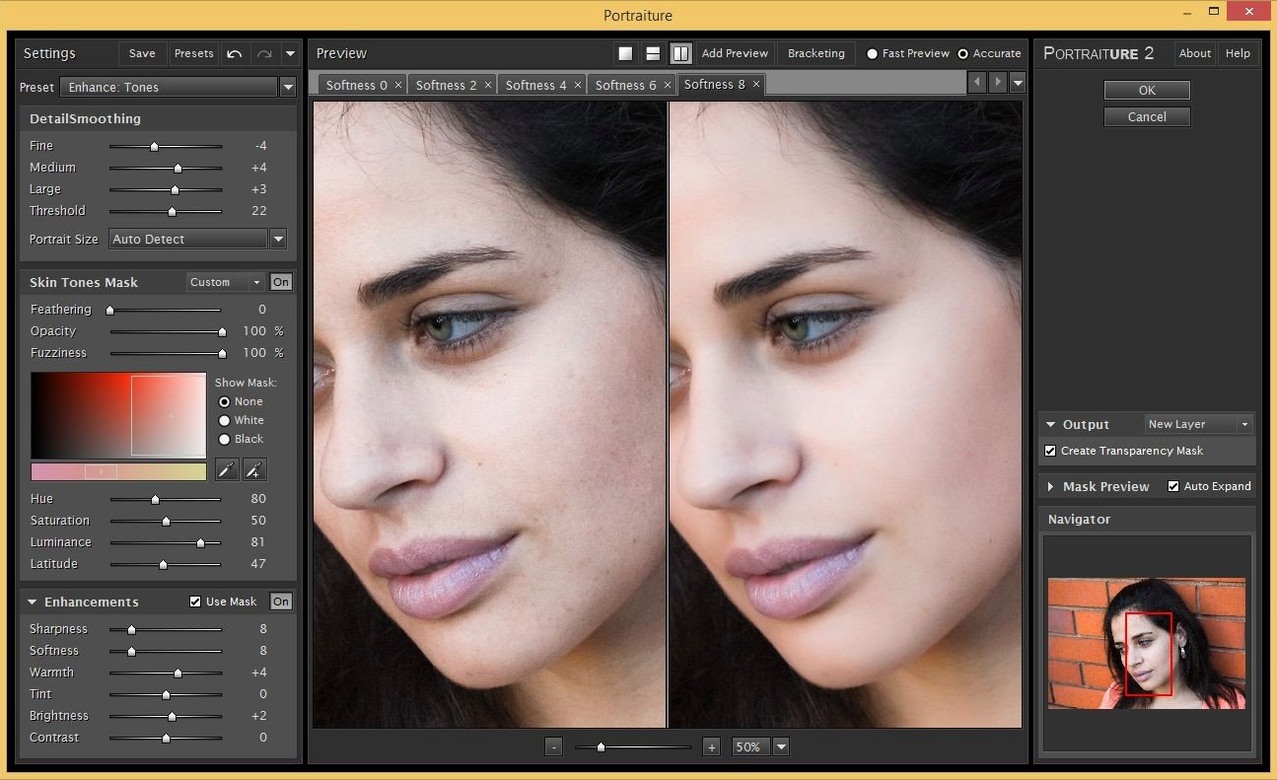
If you already use Photoshop, Lightroom Classic, or Affinity for portrait or high-ISO work, Imagenomic’s suite adds three dedicated tools without switching apps. The Photo Suite bundles Portraiture (skin smoothing and healing), Noiseware (noise reduction), and Realgrain (film-like grain and tone) into one installer.
Host apps and supported formats
- Photoshop – works as a filter plugin
- Lightroom Classic – accessed through the external editor workflow
- Affinity Photo – compatible via its plugin support
- Runs on Intel and Apple Silicon machines under macOS 13 or later
- Interface language: English
What the three plugins do
Noiseware handles luminance and chrominance noise, useful for night or high-ISO shots. Realgrain applies film grain, color, and contrast curves to mimic specific film stocks. Each plugin has its own control panel with presets and mask preview.
Mask preview reveals skin selection before smoothing
Once you start using the suite regularly, a few details become part of your routine. Portraiture’s mask preview shows exactly what the plugin considers skin before you apply any smoothing. That alone saves time on complex portraits where hair or clothing edges could get softened by accident. Noiseware includes separate sliders for luminance and chrominance noise, but the detail recovery control lets you pull back texture on areas the noise reduction flattens — useful for fabric or foliage. Realgrain’s film presets apply grain size, contrast, and color shifts in one click, though you can still tweak each parameter individually.
The suite installs as a single package. Once mounted and copied to Applications, all three plugins register themselves in the host app’s filter menu. You do not need to activate them online or create an account. That matters if you process a batch of portraits and want to move fast without interruptions.
A portrait retouch workflow from start to finish
Open a portrait in Photoshop. Duplicate the background layer so you can compare before and after later. Go to Filter > Imagenomic > Portraiture.
- The plugin opens in a separate window with a live preview. Click the Auto Mask button to let it detect skin tones on its own. Check the mask preview — green overlay shows what it selected. If it missed a shadow area or picked up a scarf, use the dropper to add or subtract from the mask.
- Start with the Smoothing slider at about 25 for natural skin. Healing handles spots and blemishes at a higher value, 40 or 50. Enhancement adds subtle micro-contrast to skin — keep it under 30 unless you want a makeup-commercial look.
- Click OK. The plugin applies the changes.
Now flatten or stamp the layers. Open Filter > Imagenomic > Noiseware for the same image. The default preset Professional handles most noise without over-smoothing. Lower the Luminance slider if you want to keep sharpness on hair or edges. Click OK.
Finally, stamp again and open Filter > Imagenomic > Realgrain. Try the Kodak Tri-X 400 preset for black-and-white, or Fuji Velvia 50 for color with fine grain. Adjust the Grain Size slider to match the image resolution — 2 or 3 for high-res files. Click OK. The image is retouched, denoised, and graded in one session.
Native ARM and Intel support with macOS Ventura minimum
The suite is compiled for both ARM and x86 64-bit architectures, so it runs native on Apple Silicon and Intel Macs. The minimum macOS is 13 (Ventura). Imagenomic’s product page also lists macOS 15 support for the Photo Suite, meaning it works on current releases without compatibility mode. The interface is English only.
Each plugin opens its own window with a live preview, so screen resolution helps — 1920×1080 or higher avoids scrolling in the control panels. The plugins do not use GPU acceleration, so the preview refresh rate depends on your CPU and the image size. Large files (50 MP or more) may take a moment to update sliders, but the results apply at full resolution.
Portrait photographers cut skin retouching from minutes to seconds
Portrait photographers are the obvious fit. If you retouch skin on several images per session, Portraiture alone can cut time from minutes per face to seconds. Wedding and event photographers who shoot at high ISO will use Noiseware as a first-pass denoise tool before sending images to clients. Black-and-white shooters who want specific film looks — Tri-X, Portra, Velvia — can use Realgrain to match a consistent style across a set.
Affinity Photo users on macOS get a noise-reduction and skin-retouch plugin that does not require leaving Affinity’s environment. The same applies to Lightroom Classic users who want dedicated retouching without moving to Photoshop for every edit.
- macOS 13 or later
- Intel or Apple Silicon
Install procedure
- Mount the disk image and run Open Gatekeeper friendly.
- Press Enter in Terminal to bypass Gatekeeper.
- Drag the app to the Applications folder.
- Launch the app when installation is complete.
Reports from players
Sign in or create a tester account to file a report.
No reports filed yet.