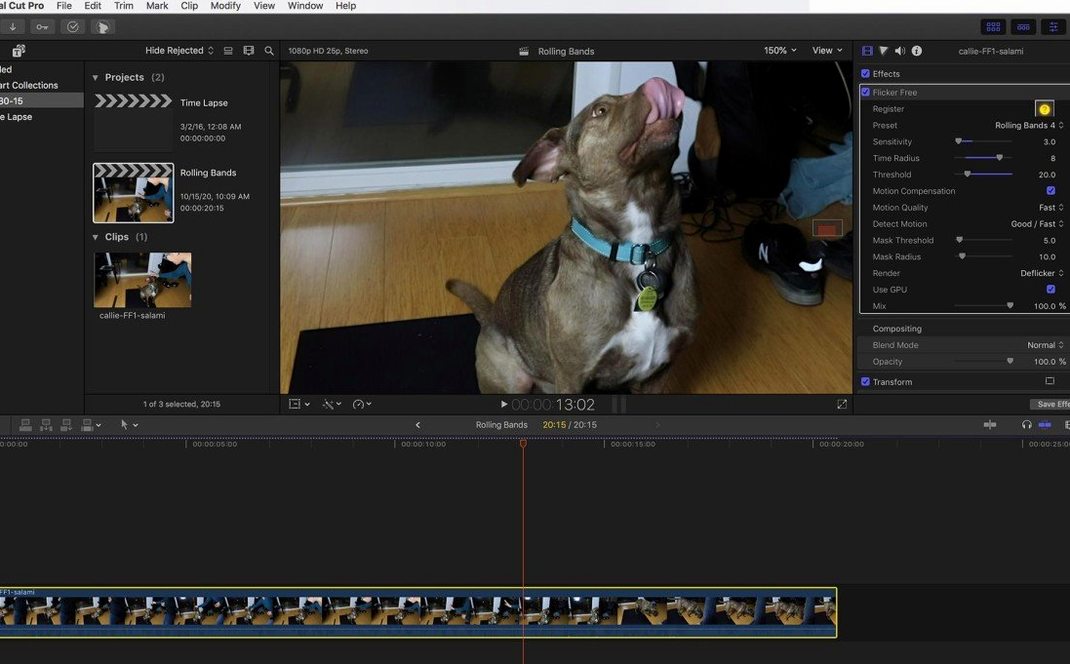
Flicker Free 2.1.6 sits on a track or bus, wherever the flicker lives. It targets flicker caused by light or electricity, and unsynchronized cameras — the kind you see in LED lamps, computer monitors, and time-lapse sequences. The plugin analyzes frames while they are being processed, so you can apply it to a short section, render a test, and check the result before committing the full project.
- Works on footage with rolling flicker from LED lamps, plus monitor flicker and time-lapse issues.
- Handles high-frame-rate footage without breaking a sweat.
- Presets cut down the setup time for common scenarios.
- 64-bit ARM and x86 builds cover both Apple Silicon and Intel Macs.
- Interface is English, and the package includes installation and activation instructions.
- Designed as a new powerful form of video deflickering, not a band-aid.
For a QA tester, the short-render test is the killer feature. You don’t have to guess whether the settings are right — run a few frames, look at the result, adjust if needed. That’s how you keep flicker out of the final export.
Used daily by event videographers under artificial lights
Flicker Free fits a specific niche, and not every editor needs it daily. The people who reach for it most often are the ones who shoot or receive footage under artificial lighting. Event videographers working in conference halls, gymnasiums, or any space with overhead fluorescent or LED arrays see rolling bands they can't fix with a simple color grade. Time-lapse shooters — architectural, landscape, product — deal with subtle brightness pulses across frames that conventional tools treat as exposure changes rather than flicker. And anyone mixing slow-motion clips from high-frame-rate cameras like the Phantom Flex or Sony FS700U will find the plugin handles the frame-rate mismatch that causes those rhythmic brightness shifts.
Motion graphics artists and compositors also benefit. When you drop a screen recording or a monitor capture into a composition, the refresh-rate flicker between the monitor and your recording camera creates a pulsing artifact that no amount of curves adjustment fixes. Flicker Free targets that directly, without requiring you to re-shoot or swap equipment. Post-production houses that ingest footage from multiple camera types — GoPros, DSLRs, cinema cameras — can use it as a cleanup pass before the edit proper starts, catching flicker that would otherwise distract in the final output.
Set preset and adjust before running on the full timeline
Before you let it run across an entire timeline, open the plugin on a representative clip and adjust these parameters:
- Preset selection — Start with the preset that matches your flicker type (LED, fluorescent, time-lapse). The preset gets you within a few percentage points of the correct analysis range, so you spend less time tweaking.
- Analysis range — If the preset doesn't clean up the flicker completely, widen the analysis window. A broader range lets the plugin compare more frames, but it also increases processing time. Find the smallest range that kills the flicker.
- Render test on a short section — Pick ten to twenty frames where the flicker is worst, apply the current settings, and render that segment. Check the result at full resolution and at playback speed. If the flicker remains, adjust the analysis range or try a different preset. If it's gone, apply to the whole clip.
These three steps save hours of waiting on full renders that still show flicker. The test render is the safety net — use it every time.
Asked whether a separate license is needed for each host
Will it work with my editing software
Flicker Free is an OpenFX plugin and also ships versions for Final Cut Pro, After Effects, Premiere Pro, and Avid. If your application supports OpenFX — DaVinci Resolve, Vegas Pro, Nuke, and others in that family — it will recognize the plugin after installation. The package includes host-specific installers, so pick the one that matches your NLE. The included instructions cover placement in the correct plug-in folder.
Does it handle both Intel and Apple Silicon Macs
Yes. The 2.1.6 build includes separate binaries for ARM and x86 architectures, both 64-bit. If you are on an Apple Silicon Mac running Rosetta for an older host app, use the x86 version. If your host runs natively on Apple Silicon, use the ARM version. The package contains both.
Works on clips that already have other effects applied
The plugin is licensed per-machine, not per-host. One activation covers all supported applications on that Mac. The installer places the plugin where each host expects it, so Final Cut Pro, After Effects, and DaVinci Resolve all see the same copy.
Applies flicker analysis during render, not during playback
Yes. Flicker Free works on processed frames, so you can stack it above or below other effects. For best results, place it early in the chain — after color space conversion but before sharpening or grain — because the flicker analysis is most accurate on the cleanest version of the footage.
One license covers Final Cut, After Effects, and DaVinci Resolve
- The plugin applies its analysis during the render pass, not during playback preview. That means you can scrub through a clip in real time without waiting for analysis to catch up. Only the rendered output shows the corrected result.
- You can keyframe the analysis range. If a clip changes lighting halfway through — a lamp switches from fluorescent to LED, or the camera pans into a different room — the plugin can ramp its analysis window accordingly instead of using one static setting for the whole clip.
- Presets are grouped by flicker type, so you don't have to remember which numerical range worked last time. Once you find a preset that handles a specific shooting setup, it stays on the list for that session and future projects.
- The plugin processes frames sequentially, not in batch. This avoids the memory spike that sometimes occurs when a filter tries to analyze every frame at once, and it means you can interrupt a long render and resume from where you stopped without losing progress.
- macOS (version not specified)
- 64-bit Intel or Apple Silicon
- English interface
Install procedure
- Follow the included installation and activation instructions.
Reports from players
Sign in or create a tester account to file a report.
No reports filed yet.