UJAM Symphonic Elements STRIIIINGS 1.3.1 — Mac build
VST Plugins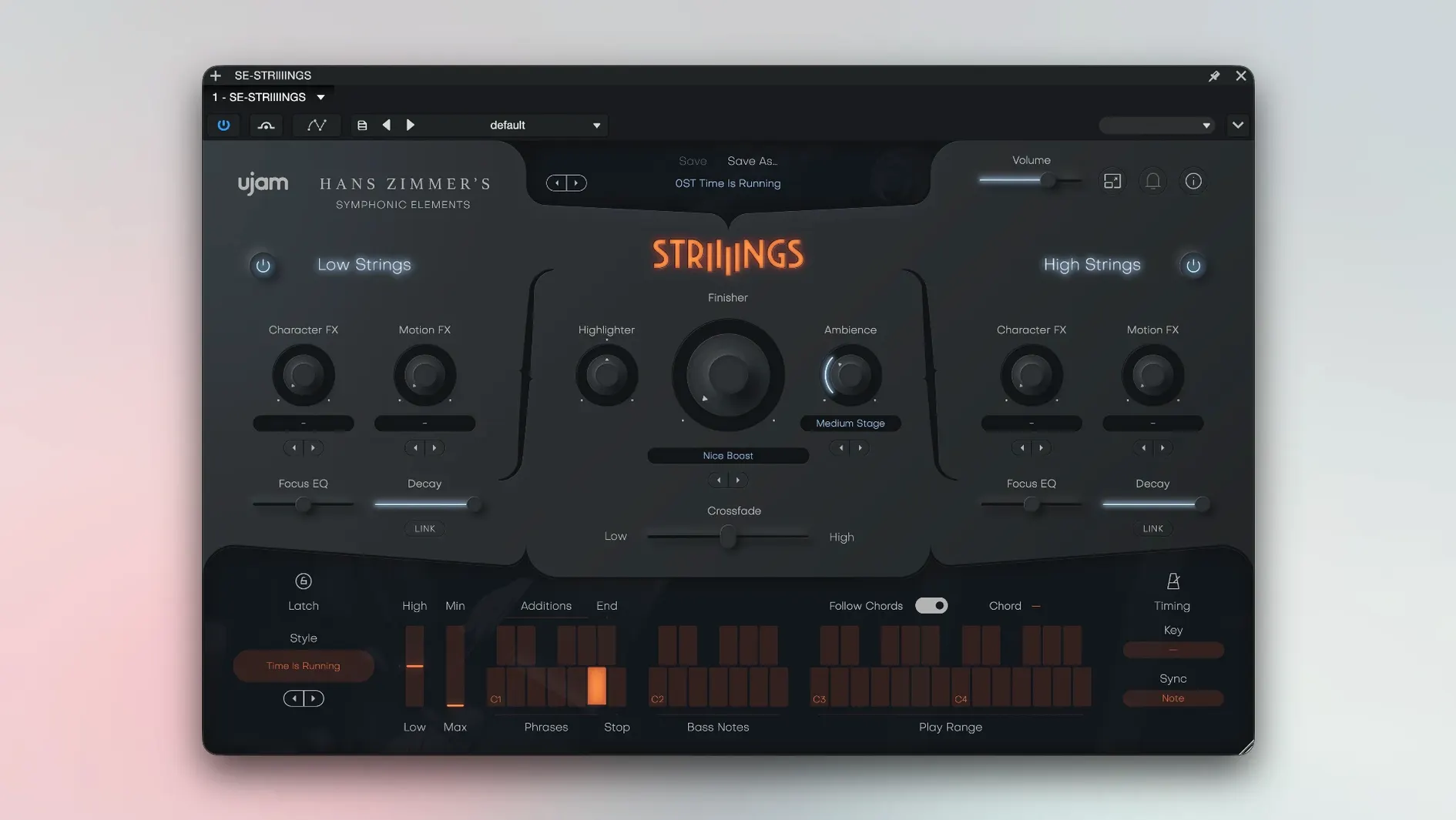
UJAM Symphonic Elements STRIIIINGS 1.3.1 runs on any Mac from macOS 10.14 Mojave onward, and it supports both Apple Silicon and Intel processors. It is 64-bit only and asks for 4 GB of RAM. If your host is current and your Mac is within that range, the plug-in loads without fuss.
What it covers
- Low Strings layer for basses and celli
- High Strings layer for violins and violas
- 60 playable styles for quick texture shifts
- A dedicated sound-design element for going beyond plain section playing
- Crossfade control to blend the two orchestral layers
How it sounds
The core samples come from Hans Zimmer’s string library, and the plug-in treats them as modern ensemble textures rather than traditional solo instruments. The Low/High split gives you the weight of basses and celli on one side and the air of violins and violas on the other, with the Crossfade letting you move between them smoothly. The sound-design layer is where it stops being a plain string section — it turns the recorded material into something more malleable for cinematic scoring and texture work. The interface language is English throughout.
How it compares
STRIIIINGS sits in a specific corner of the orchestral plug-in market. Compared to a straight-up sampled string library like Orchestral Tools’s Berlin Strings or Spitfire Audio’s BBC Symphony Orchestra, STRIIIINGS is less about note-by-note articulation and more about ready-made gestures. Those libraries give you individual players and bowings; STRIIIINGS gives you a pre-mixed ensemble that you can steer with the Crossfade and the 60 styles. It trades detail for speed — you get a convincing string-section wash or a sound-designed layer in a few clicks.
Next to a dedicated synth pad plug-in such as Output’s ARCADE or Native Instruments’s Straylight, STRIIIINGS has the advantage of being rooted in real recordings. The sound-design layer processes those Zimmer-origin samples rather than generating tones from oscillators, so the result keeps a human, orchestral character even when it gets abstract. The trade-off is that you cannot build a sound from scratch — you work with what the 200 presets and the two-layer architecture give you.
UJAM’s own Finisher series (Finisher RETA, EXCITER, etc.) lets you mangle any audio in a similar sound-design spirit, but Finisher is a multi-effect, not a playable instrument. STRIIIINGS is the instrument itself, already voiced for string textures, which makes it faster for composers who want strings as the starting point, not as a source to be processed.
Real-world scenario: a trailer music composer’s quick draft
Consider a composer working on a 90-second trailer cue. With STRIIIINGS, they can set Low Strings to a slow, dark style and let the basses and celli build underneath a percussion loop. For the hit, they switch to a High Strings style with the sound-design layer engaged; the Crossfade pushes the violins forward. The whole switch takes two MIDI program changes and one automation lane. The composer does not need a full scoring template or ten instances of Kontakt — one STRIIIINGS channel covers both sections with the Crossfade handling the transition.
Force a DAW rescan when the plug-in doesn't appear
- The plug-in does not appear in the DAW’s plug-in list after installation. UJAM plug-ins need the host to rescan VST2/VST3/AU folders. Force a rescan or restart the DAW. Also check that the plug-in file landed in the correct system folder — sometimes the installer puts it in the user-level folder instead of the system one.
- The first launch asks for an activation code. The package includes a K’ed by MORiA release, so there is no code to enter. Open the plug-in twice: the first launch initializes the license, and the second launch runs it. If it still asks, confirm your system date is correct — a wrong date can trip the authorization check.
- The sound is silent or very quiet. The default patch may have the volume fader low or the Crossfade set to one side. Pull the fader up and move the Crossfade control to the middle to hear both layers. Also verify the instrument track is receiving MIDI on the correct channel.
- The interface looks tiny or huge on the screen. STRIIIINGS does not have a user-accessible scaling control. Some DAWs let you set a default plug-in zoom. Work around it by adjusting your display’s scaling in macOS System Preferences if you need a different size.
Film and game composers audition 60 textures in seconds
Film and game composers who write to picture will use STRIIIINGS for its speed. The 60 styles let them audition a texture in seconds, and the sound-design layer saves them from routing strings to a second plug-in for processing. Beatmakers and electronic producers who want an orchestral color without learning a full sampled library will also find it useful — the presets are playable out of the box, and the Crossfade makes blending trivial. Users who need isolated string articulations (pizzicato, spiccato, sul ponticello) will want a more traditional library instead, because STRIIIINGS does not offer those articulations as separate patches. It also suits composers working in a single-computer setup who prefer to keep the track count low — one instance handles what would normally take two or three tracks in a full template. Anyone running a 32-bit host or a Mac older than macOS 10.14 is out of luck, since the plug-in requires a 64-bit host and Mojave at minimum.
- macOS 10.14 or later
- Apple Silicon or Intel processor
- 64-bit software only
- 4 GB RAM
Questions from the notes
Does STRIIIINGS work on Intel Macs?
Yes. The plug-in is available for both Apple Silicon and Intel Macs, and it requires macOS 10.14 or later with 64-bit software.
What does the Crossfade control do?
It blends between the Low Strings layer (basses and celli) and the High Strings layer (violins and violas) so you can shape the balance of the ensemble.
How many styles does it include?
The plug-in includes 60 styles covering modern string-ensemble textures.
Install procedure
- Follow the install and activation instructions included in the package.
- Open the plug-in twice the first time you launch it.
Reports from players
Sign in or create a tester account to file a report.
No reports filed yet.