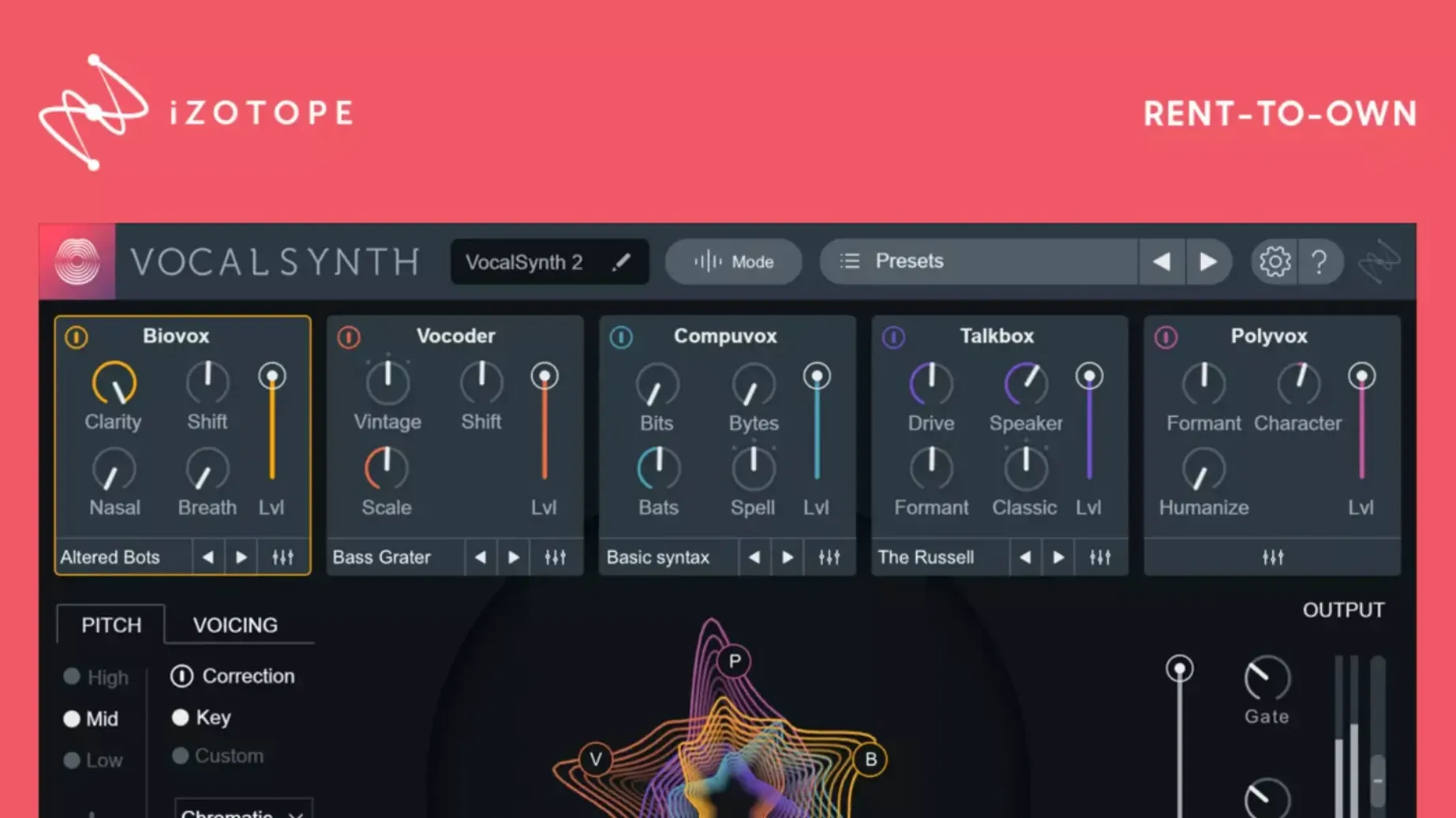
VocalSynth 2 is for producers and engineers who need a dedicated vocal shaper without stacking a dozen individual effects. It fits on an audio track for direct processing or on a bus to blend processed and dry signals. Its three processing modes—Auto, MIDI, and Sidechain—cover different workflows, from real-time vocoder-style effects to triggered modulation from another track.
Tuning a vocal track
Drop VocalSynth 2 on a vocal track, set it to Auto mode, and the spectral display responds to vowel sounds while the stompbox-style effects apply compression, distortion, or filter sweeps. The enhanced spectral display shows exactly what the plug-in is tracking.
Creating harmonies on a bus
Route a vocal to a bus, enable MIDI mode, and play harmonies from a keyboard. The plug-in processes the incoming audio against the MIDI notes, generating layered vocal parts. It keeps the mix clean because the bus handles the wet/dry balance.
Sidechaining for rhythmic effects
Use Sidechain mode on a bus to modulate VocalSynth 2’s parameters from a kick or snare track. The vocoder-inspired signal modulation creates rhythmic filter or pitch movement without duplicating the vocal chain.
Electronic music producers working with sample-based vocals often find VocalSynth 2 useful when a vocal snippet needs to sit differently in a mix. Drop a short phrase onto an audio track, enable Auto mode, and adjust the formant shift to match the key of the surrounding elements. The spectral display shows which vowel characteristics the plug-in is tracking, making it easier to repeat the same color across different takes. This workflow saves time compared to resampling and pitch-shifting through separate tools.
Sits between dedicated vocoders and multi-effects processors
VocalSynth 2 sits between dedicated vocoder plug-ins and multi-effects vocal processors. It shares ground with Antares Throat and Waves Ovox, but with a different focus.
- Antares Throat models vocal tract shapes and works well for subtle formant shifts and physical modeling, but it lacks the stompbox-style effects section that VocalSynth 2 bundles in a single window.
- Waves Ovox offers vocoding and re-synthesis with a simpler interface, though its modulation options are more limited than VocalSynth 2's three processing modes and inter-plug-in communication with Neutron or Ozone.
- VocalSynth 2 combines formant shifting, vocoding, pitch control, and the stompbox effects in one plug-in, which means fewer instances and less routing than chaining separate processors.
None of these alternatives offer the iZotope ecosystem integration that lets VocalSynth 2 share data with Tonal Balance Control or Ozone for a more unified mix stage.
Suits pop, electronic, and hip-hop producers working across multiple busses
Producers who work with vocal-heavy genres—pop, electronic, hip-hop—get the most out of it because they can process a lead vocal, a harmony track, and a background pad with one plug-in across different busses. Mix engineers who use iZotope's other tools will find the inter-plug-in communication useful for matching vocal processing to the overall tonal balance of a mix. Sound designers working on game audio or film scoring can use MIDI mode to generate vocal textures from a keyboard, which is more direct than using a separate sampler or synthesizer for the same role.
Mac users with both Intel and ARM machines benefit from the native Apple Silicon support introduced in version 2.5.0, which avoids running Rosetta emulation and keeps the plug-in responsive inside a DAW session.
Set processing mode to Auto, MIDI, or Sidechain first
After installing VocalSynth 2, change a few defaults before diving into a mix:
- Set the processing mode to match your workflow. Auto mode works for instant coloring, MIDI mode for note-triggered effects, and Sidechain mode for dynamics-driven modulation.
- Adjust the mix knob to a lower wet level, around 50–60 percent, so VocalSynth 2 blends with the dry signal instead of replacing it entirely. The stompbox effects can overwhelm a vocal if used at full wetness.
- Open the spectral display and check that the plug-in is tracking vowel sounds correctly for the vocalist. If the display jumps erratically, the input level may be too low or too high.
- If using the iZotope ecosystem, enable inter-plug-in communication with Neutron or Ozone so VocalSynth 2 can respond to the tonal balance of the whole mix.
Run in Auto mode with mix at 50 percent to hear stompbox effects
Start by running VocalSynth 2 on a single vocal track in Auto mode. Listen to how its stompbox effects—compression, distortion, filter—change the vocal character. Keep the mix knob at 50 percent to hear the difference clearly. If the result sounds artificial, back off the formant shift before adjusting other parameters.
Try MIDI mode with a simple chord on a keyboard. Route the vocal to a bus, enable MIDI mode, and play two or three notes. The plug-in will produce harmonies based on the incoming audio and the notes. This is useful for testing whether the plug-in's vocoder response fits the track's key without committing to a full arrangement.
Sidechain mode is worth testing on a rhythmic track. Enable Sidechain mode on a bus, send a kick signal to the sidechain input, and adjust the modulation depth. The effect works well on sustained vocal pads or background phrases, but it can sound too aggressive on lead vocals unless the depth is kept low.
If you search for izotope vocalsynth 2 free or vocalsynth 2 free download on other sites, you will find unofficial versions that lack the native Apple Silicon support and the fix for authorization recognition that version 2.6.1 provides. Stick with the full install to avoid compatibility issues.
- Fixed an issue where existing authorization was not recognized for some users after updating from version 2.5.0.
- macOS: Compatible with macOS Monterey 12.3.x and later
- Architecture: Intel and Apple Silicon
- Interface language: English
Questions from the notes
What processing modes does VocalSynth 2 offer?
It offers Auto, MIDI, and Sidechain processing modes for different workflow needs.
Does VocalSynth 2 work with other iZotope plug-ins?
Yes, it connects with Neutron, Ozone, and Tonal Balance Control in the iZotope ecosystem.
Install procedure
- Open the package and run the installer.
- Follow the on-screen instructions to complete installation and activation.
Reports from players
Sign in or create a tester account to file a report.
No reports filed yet.