Toontrack EZmix Bundle 3.2.2 — Mac build
VST Plugins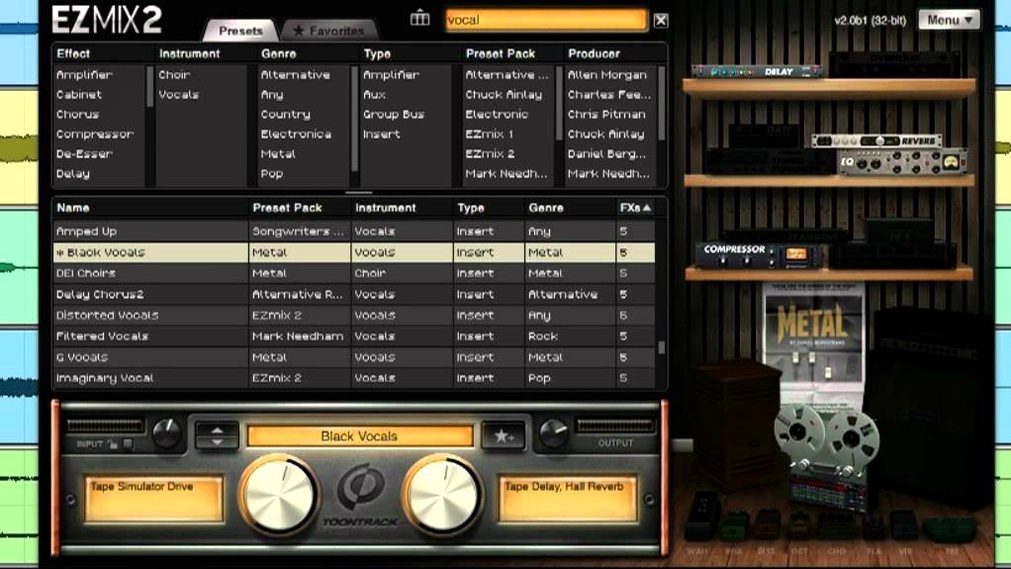
You drop EZmix on a channel strip in your sequencer, pick a preset, and the track starts sitting better in the mix almost immediately. The redesigned interface in EZmix 2 keeps the workflow simple: choose a category, scroll presets, listen, move on.
How EZmix Works
Preset — A professionally designed effect chain for a specific instrument or channel, covering drums, vocals, guitar, bass, and keyboards.
Category — Groups presets by instrument or purpose, so you can jump from a snare drum to a lead vocal without touching individual plugins.
Host — An independent host for guitar practice, with included amp and cabinet simulations, letting you play through EZmix without a full DAW.
Channel strip — Where you insert EZmix on a sequencer track; the preset processes the audio in place.
EZmix 2 — Includes all previous EZmix functionality and content, so nothing from earlier versions is lost.
Suited for guitarists who practice without a full DAW
EZmix is suited for several kinds of Mac users, not just people who spend all day inside a DAW.
- Guitarists who practice without a full DAW – The independent host with amp and cabinet simulations means you can plug in, pick a preset, and play. No need to open Logic, start a project, or route anything through a complex signal chain.
- Music producers working under deadlines – If you mix other people’s tracks or need to deliver rough mixes quickly, the preset system saves time. You audition a few choices per channel and move on, rather than dialing in EQ, compression, and reverb separately.
- Mix engineers on a single Mac – The bundle covers enough ground (drums, vocals, guitar, bass, keyboards, mastering) that you can build a full mix without loading a dozen individual plugins. That keeps CPU usage reasonable and the session tidy.
- Hobbyists who want better-sounding demos – You do not need to know what a multiband compressor does. Pick the “Vocal – Pop Lead” preset, and the track will sound closer to a finished recording.
How it differs from other Mac mixing apps
EZmix vs. iZotope Neutron
Neutron is an intelligent mixing assistant that analyzes your audio and suggests settings. EZmix relies on a curated library of presets created by professional engineers. Neutron requires a bit more learning to get the most out of its assistant features; EZmix is preset-first and works immediately after insertion. Both run on Apple Silicon and Intel Macs.
EZmix vs. Waves PRS SuperModels
Waves PRS SuperModels focuses on guitar and bass amp modeling only. EZmix includes that (amp and cabinet simulations) but also covers drums, vocals, keyboards, and mastering. If you need a single tool for guitar tone, PRS SuperModels gives you a narrower, deeper set of models. EZmix is broader and handles the whole mix.
EZmix vs. Logic Pro Channel Presets
Logic Pro includes channel strip presets that bundle stock plugins. EZmix offers its own library, which may sound different from Logic’s built-in chains. If you already own Logic, EZmix adds a separate set of presets designed by different engineers. The independent host in EZmix is something Logic does not have as a standalone app.
Support for EZmix packs released from Q4 2025 onward
Version 3.2.2 brings support for EZmix packs released from Q4 2025 onward. If you plan to buy any new packs after that date, update to this version; older builds will not load them.
The redesigned interface in EZmix 2 keeps all previous functionality and content, so any presets you built in EZmix 1 still appear. No migration step is needed.
The installation is a standard disk image mount and run procedure. No authorizer or iLok is required for the k’ed release by Team V.R — just mount the DMG and install.
Start with one instrument to learn the preset categories
- Start with one instrument. Open a project with a single drum loop or a vocal track. Insert EZmix, go through the presets in that category, and listen to how each changes the tone. You will learn the categories faster than jumping between different instruments.
- Use the independent host for guitar first. Before you use EZmix in a DAW, open the standalone host, pick an amp preset, and play for a few minutes. That lets you hear the amp and cabinet simulations in isolation, so you know what the guitar section sounds like on its own.
- Keep the preset list short. The library is large. Pick a few favorites per instrument and stick with them for a week. After that, branch out to others. Limiting choices early speeds up your workflow.
- Check version 3.2.2 before adding new packs. If you download any EZmix packs released from Q4 2025 onward, confirm you are on 3.2.2. You can update through the Toontrack Product Manager or your My Products area on their site.
- Fixed: Support for EZmix packs released from Q4 2025 onward requires version 3.2.2.
- macOS 10.13 or later
- Apple Silicon or Intel
Questions from the notes
What does version 3.2.2 change?
Version 3.2.2 is required for support of EZmix packs released from Q4 2025 onward. It was released on 2025-12-05.
Install procedure
- Mount the downloaded disk image.
- Run the standard installation procedure.
Reports from players
Sign in or create a tester account to file a report.
No reports filed yet.