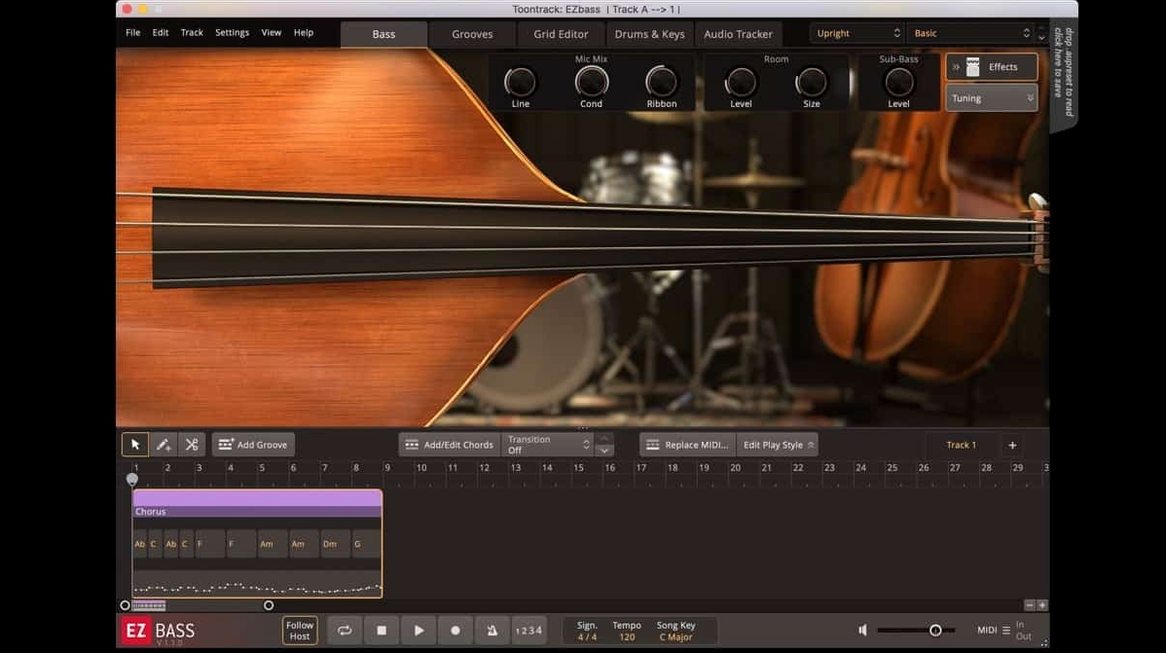
EZbass 1.3.3 ships with two sampled bass guitars: one vintage, one modern. The plugin's value sits in its controls, which shape both the performance and how the bass sits in a mix.
Bass Engine — The sampled instruments respond to playing dynamics, giving you the choice between round vintage tones or the tighter, brighter modern sound.
MIDI Browser — A library of bass MIDI patterns across styles. Drag a pattern in, then tweak it to fit the song's feel.
Song Track — A dedicated arrangement view where you compose, change, and rearrange bass parts without leaving the plugin.
Audio-to-MIDI — Feed it drum or keyboard MIDI and it generates a bass part that follows the groove. Useful for locking the low end to the kick drum.
Amplifier and Effects — Controls for amp tone, EQ, compression, and effects. Adjusting these alters the character of the bass before it hits your DAW's mixer.
Drag drum MIDI into audio-to-MIDI for a fast rough mix
A songwriter in a bedroom studio has a demo with a drum loop and a simple piano part. The deadline for a rough mix is tomorrow. Opening EZbass 1.3.3, they drag the drum MIDI into the plugin's audio-to-MIDI section. Within seconds, a bassline appears, locked to the kick and snare. They switch the bass engine from the modern to the vintage sample, drop in a fingerstyle pattern from the MIDI browser, and nudge a few notes in the Song Track view. No recording, no DI box. The part is done inside the plugin.
For this kind of workflow, the two included bass guitars give you a choice without needing to load additional content. The vintage sample works for warm, rounded lines; the modern one sits better in a dense pop or rock mix. Both respond to velocity, so a quick edit of note velocities in the Song Track changes the performance feel.
Customize keyboard shortcuts before building a part
In version 1.3.3, the Settings section now includes keyboard shortcut customization. If the default shortcuts conflict with your DAW or muscle memory, change them here before building a part. That saves time later when you are in a flow.
The other setting to check early is output level. The internal amplifier and effects section can push the bass signal hot. Lower the amp's gain or trim the output inside the plugin to keep headroom in your mix bus.
Filter patterns by style or tempo in the MIDI browser
- MIDI browser search — The browser includes a search field. Type a style or tempo range to filter the pattern library instead of scrolling through folders.
- Drag-and-drop from Song Track — The arrangement view lets you drag an entire bass line or a single section into your DAW as MIDI. That makes it simple to edit the part further in your sequencer after the plugin generated the foundation.
- Right-hand mute articulation — Version 1.3.3 adds this for the Rock Legend EBX expansion. Even if you do not own that expansion, the articulation control is present in the engine for any compatible library. Check it when you want a percussive, palm-muted attack.
- Project icon update — The standalone version now uses a macOS Tahoe-style icon. Minor, but it stops the dock from looking like a relic from 2012.
Runs on macOS 10.15 or later with ARM and Rosetta 2 support
EZbass 1.3.3 runs on macOS 10.15 or later. Both ARM and x86 64-bit Macs are supported. On an Apple Silicon machine, the plugin runs under Rosetta 2 if no native ARM version is installed, or natively if the installer provides an ARM build. Toontrack's documentation does not distinguish which architecture the installer targets, so expect it to work either way. The disk image mounts like a standard macOS installer; run the setup and authorize the installation. The plugin appears in your DAW's instrument list after a scan.
Audio-to-MIDI conversion uses the same engine as Superior Drummer 3. That means it analyzes transients and pitch, not just timing. If you feed it a kick-and-snare pattern, the generated bass part typically hits the root notes on the downbeat and follows the kick's rhythm. It works best with clean, isolated drum MIDI or audio stems. Dense polyphonic keyboard MIDI may produce less predictable results, but you can edit the output in the Song Track.
No performance numbers here — every Mac handles sample playback differently. Keep an eye on your DAW's latency buffer when playing the vintage bass with long note tails, as sample streaming can increase load.
Start with a drum MIDI clip and four-on-the-floor ghost notes
The session starts in a DAW with a drum MIDI clip already placed on a track. EZbass opens as a virtual instrument on a new instrument track. The drummer played a four-on-the-floor pattern with ghost notes on the snare.
First, the user drags the drum clip onto the audio-to-MIDI conversion area in the plugin's interface. The plugin generates a bassline that follows the kick hits with root notes. The user hears the result, decides it is too busy, and switches the conversion mode to "simple" (if available) or manually removes some notes in the Song Track view. The generated line becomes the foundation.
Next, the user selects a pattern from the MIDI browser — a four-bar repeating line that fits 120 BPM pop. They drag it into the Song Track, which replaces the generated line. They then edit the last two bars to create a variation for the chorus: higher register notes, eighth-note rhythm. The Song Track shows the arrangement as a bar-by-bar grid, so moving a section to the chorus position is a drag-and-drop action.
The bass engine is set to the vintage guitar sample. The user adjusts the amp section: a slight mid-boost at 800 Hz, compression set to 4:1 ratio, and a touch of room reverb. The effects section adds a mild overdrive to give the chorus part more presence.
After arranging the full song structure, the user exports the bass MIDI from the Song Track to a new MIDI clip in the DAW. The plugin is bypassed. Now the bass part is plain MIDI data, editable note by note with any instrument or synth. The session is ready for mixing.
If later the producer wants a different feel, they reload the plugin with the modern bass sample and swap the amp settings to a clean DI sound. The Song Track keeps the arrangement, so no part of the composition is lost. That is the workflow EZbass supports: generate, arrange, edit, export, and move on.
Version 1.3.3 adds right-hand mute articulation support for the Rock Legend EBX, which matters for percussive playing styles.
- Added support for right-hand mute articulation used in Rock Legend EBX.
- Added support for changing some keyboard shortcuts in Settings.
- Updated Mac icons to macOS Tahoe style.
- macOS 10.15 or later
- Architecture: both Intel and Apple Silicon
- Interface language: English
Questions from the notes
What macOS versions does EZbass support?
EZbass requires macOS 10.15 or later and runs on both Intel and Apple Silicon Macs.
What does version 1.3.3 fix?
Version 1.3.3 fixes timing issues in audio export at sample rates other than 44.1 kHz.
Install procedure
- Mount the downloaded disk image.
- Run the standard installation procedure.
Reports from players
Sign in or create a tester account to file a report.
No reports filed yet.