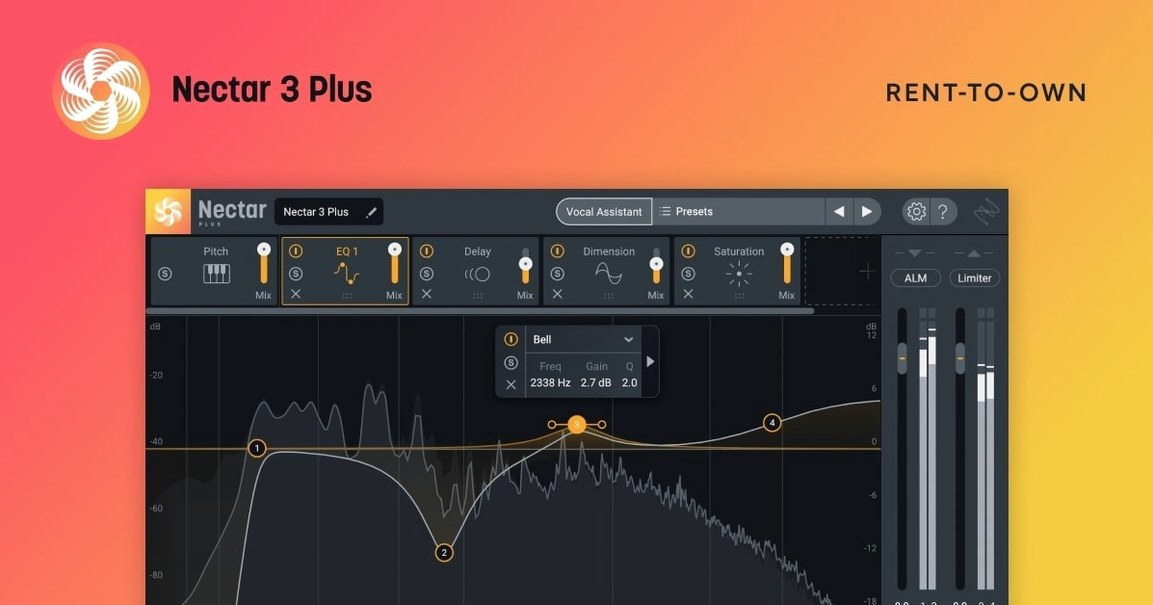
Vocal mixing engineers, producers, and podcasters who need more than basic EQ and compression reach for Nectar 4. It’s a suite of modules that handles the full chain—leveling, pitch, harmony, breath removal, reverb, delay, and width—inside a single plugin. The new Auto-Level keeps loudness consistent across a take. Voices and Backer (Standard and Advanced only) generate harmonies or background layers without recording extra tracks. Vocal Assistant analyzes the source and sets up a starting chain, which you can tweak manually. The interface is English only, and the plugin runs on macOS 10.15 and later, both Intel and Apple Silicon.
- Includes Auto-Level, Voices, Backer, and Vocal Assistant modules
- Breath-noise removal and automatic loudness leveling built in
- Available in Elements, Standard, and Advanced editions
- Voices and Backer are Standard/Advanced exclusive features
- Works in most major DAWs (VST3, AU, AAX) on macOS
- Full Apple Silicon native support, no Rosetta required
For detailed control of tone, compression, echo, and width, Nectar 4 gives you the tools without forcing you through a hundred submenus. The version 4.1.0 update added Windows HiDPI support and fixed an iLok authorization issue for Standard users.
Music producers mixing others' vocals benefit most from Standard or Advanced
Music producers who mix other people's vocals regularly will find the most value in the Standard or Advanced editions. The combination of Vocal Assistant for quick starting points and the manual modules for fine-tuning means you can move through a mix faster than with a handful of separate plugins. Session vocalists who record themselves at home also benefit—Auto-Level in Advanced smooths out takes where mic distance or delivery shifts between lines, saving time you would otherwise spend clip-gaining or riding faders.
Content creators doing voiceover or narration work get a cleaner result with less effort. The breath-noise removal module catches the quick inhales that accumulate across a podcast or tutorial track, and the automatic leveling keeps volume consistent without manual compression tweaking. For producers who work in genres with layered harmonies—pop, indie, electronic—Voices and Backer replace the workflow of recording multiple takes or programming a separate synth or sampler. They generate the layers inside the same plugin, which keeps the session file less cluttered.
Audio post engineers working on short films or web videos can use Vocal Assistant to establish a baseline vocal chain quickly, then adjust the specific modules for the mix. The all-in-one approach means fewer plugins per track, which helps on systems where plugin latency adds up across a session.
Authorization failures fixed by updating to version 4.1.0
The most frequent issue users hit is authorization failure for Nectar Standard, particularly when using iLok. Version 4.1.0 patched this, but if you are on an older version and see the error, updating to 4.1.0 resolves it. If the plugin does not appear in your DAW after installation, check that your DAW is scanning the correct plugin folders—Nectar installs AAX, VST3, and AU variants separately, and some DAWs need a manual rescan or a restart to pick up new plugins.
Another snag: the plugin does not show up on macOS versions older than 10.15 at all. If you are on macOS Mojave or earlier, Nectar 4 will not install. The 4.1.0 update also raised the minimum to macOS Ventura 13.7.4, so if you are on a version between 10.15 and Ventura, you need to stay on an earlier Nectar 4 build or update your OS. Users who rely on older Mac hardware that cannot run Ventura will need to use an earlier version of the plugin.
If Vocal Assistant produces a chain that sounds too aggressive or overly processed, start by reducing the individual module amounts rather than bypassing the whole chain. The assistant sets levels based on its analysis of the input, and a dry or intimate vocal often needs less compression and reverb than the default suggests. Dial back the Compressor threshold and the Reverb mix first, then adjust the EQ if the tone feels off.
Voices and Backer add harmonies and low-octave layers
Voices and Backer are worth exploring even if you do not think you need harmonies. Backer can generate a subtle low-octave layer that thickens a lead vocal without sounding like a separate part. Voices, meanwhile, lets you set the number of harmony voices and their intervals independently, which means you can create unison doubles as easily as a three-part harmony. Both modules respond to the pitch of the source material, so they work on spoken word and sung vocals alike.
Auto-Level, exclusive to Advanced, does not just level the whole track. It adjusts gain dynamically across the performance, which helps with sections where the vocalist pulls back from the mic or leans in during a chorus. It makes subsequent compression easier to dial in because the input level is already consistent.
The breath-noise removal module has a threshold control. If it removes too much or not enough, adjust the threshold rather than bypassing the module entirely. A lower threshold catches more breath noise but may start affecting sustained notes if pushed too far.
macOS minimum bumped to Ventura 13.7.4 in 4.1.0 update
The 4.1.0 update, released June 25, 2025, brought three meaningful changes for Mac users. The most practical is the macOS minimum bump to Ventura 13.7.4. If you are already on Ventura or later, nothing changes. If you were holding onto an older OS, this update forces the move forward, but it also means future updates will assume that baseline, so compatibility with newer Mac hardware and Apple Silicon improvements should be more reliable.
The iLok authorization fix for Nectar Standard matters if you use iLok for plugin management. Previous versions could fail to validate the license even when it was properly activated, causing the plugin to run in demo mode or not load at all. The 4.1.0 build clears that error. For anyone who has searched for izotope nectar 4 crack mac or izotope nectar 4 torrent to bypass license issues, the official fix in this update is the proper solution—no need to look for izotope nectar torrent or izotope nectar mac torrent alternatives.
Windows HiDPI support was added in this version, which does not affect Mac users directly, but it means the same codebase now handles high-resolution displays on both platforms. For Mac users running the plugin via CrossOver or similar translation layers, the improvement might carry over indirectly. The supported DAW/NLE versions were also updated, so if your DAW recently updated its own compatibility list, Nectar 4.1.0 should match it.
iZotope Nectar polishes vocal tracks with EQ, compression, and pitch correction for music producers.
- Fixes: Windows HiDPI support added; authorization failure for Nectar Standard with iLok fixed
- Changes: supported DAW/NLE versions updated; minimum macOS version raised to Ventura 13.7.4
- macOS Ventura 13.7.4 or later
- Intel or Apple Silicon
- Interface language: English
Questions from the notes
What macOS versions does Nectar 4 support?
Nectar 4 supports macOS 10.15 and later. The latest update (4.1.0) changed the minimum to macOS Ventura 13.7.4.
Install procedure
- An installation and activation guide is included in the package.
Reports from players
Sign in or create a tester account to file a report.
No reports filed yet.