Stock macOS gives you a set of shortcuts and gestures, and then expects you to live with them. BetterTouchTool is the utility that takes over from there. It redefines how your input devices behave, turning the Touch Bar, trackpads, mice, and even the Siri Remote into something that works the way you do.
What it does alongside your usual tools
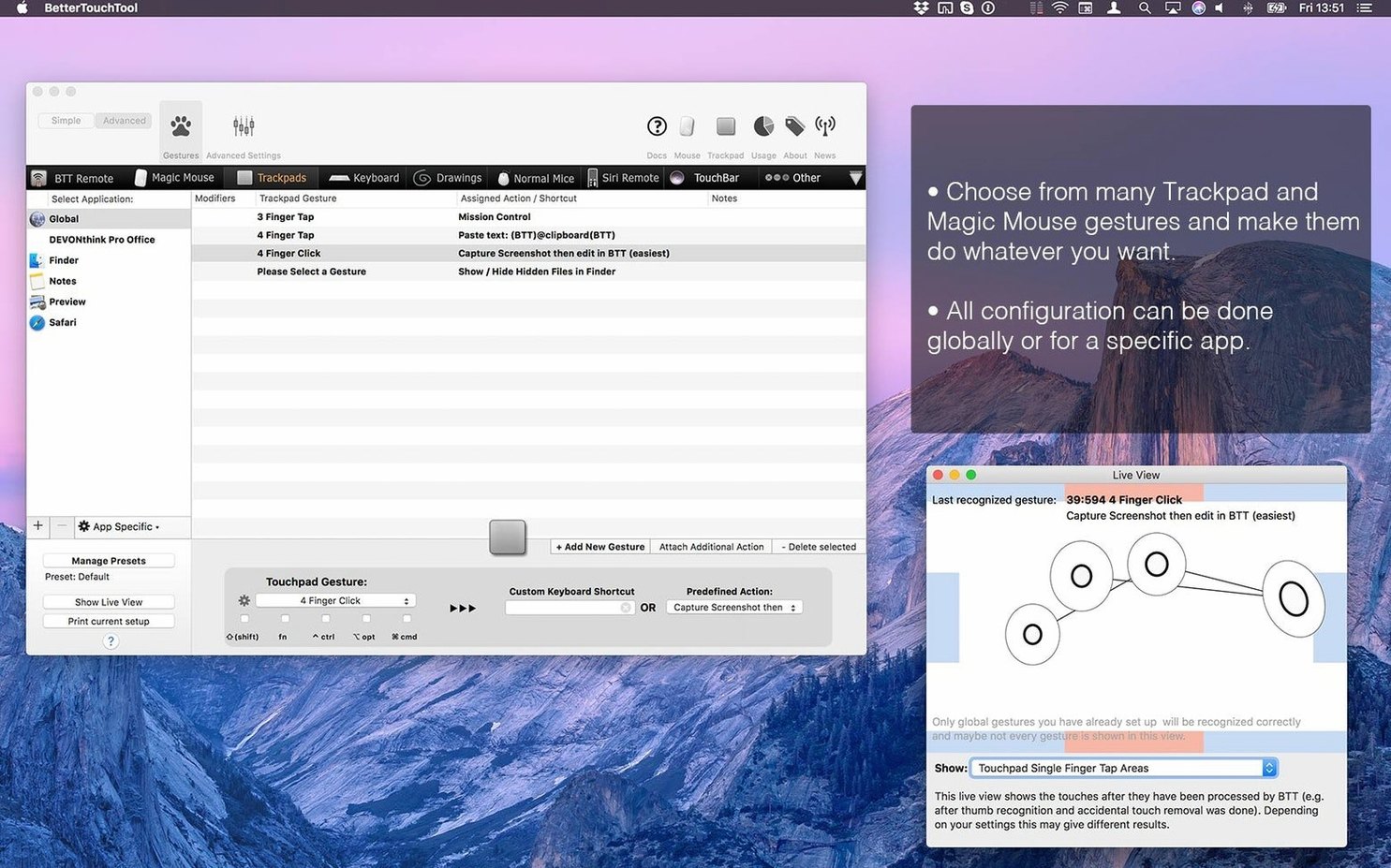
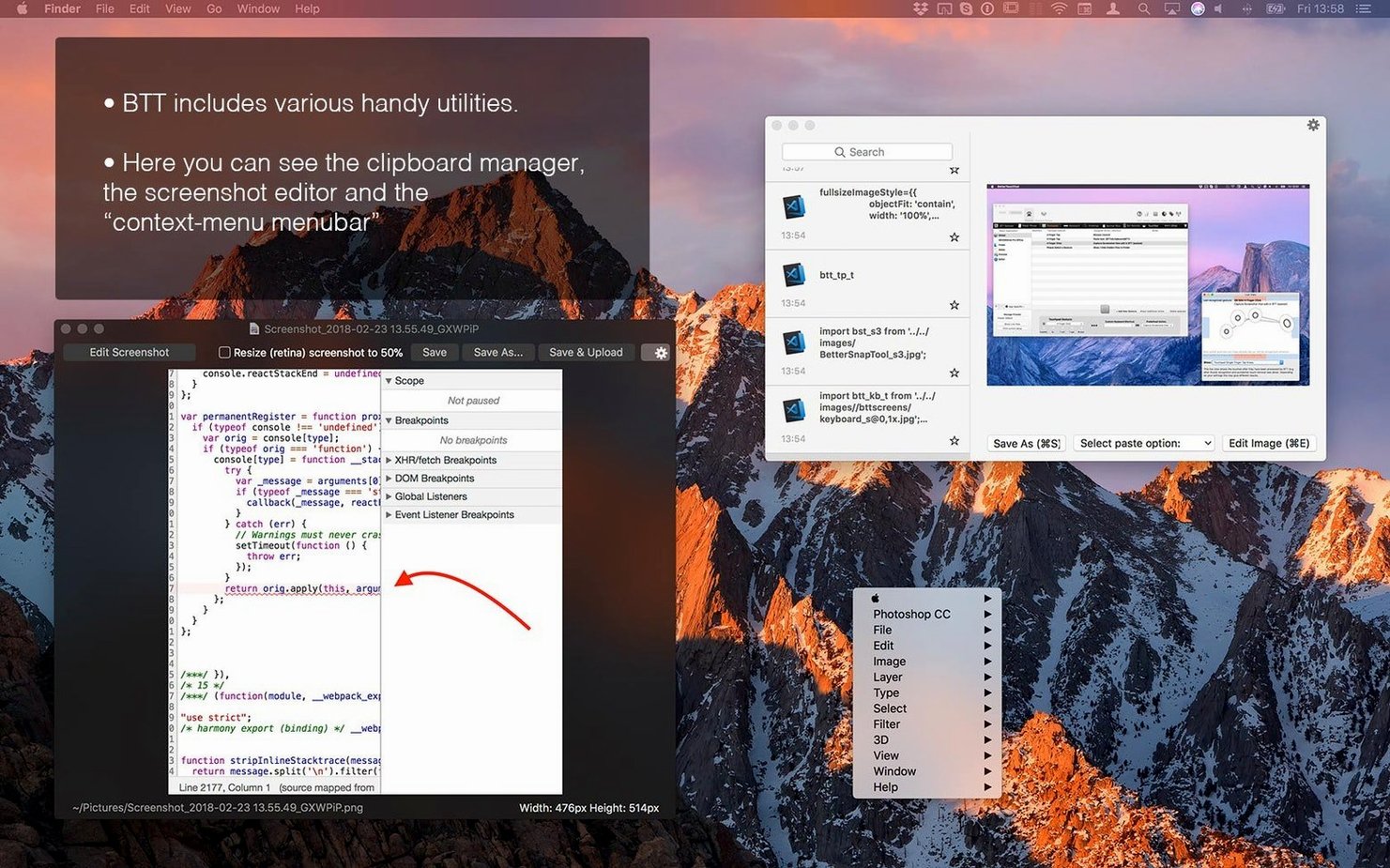
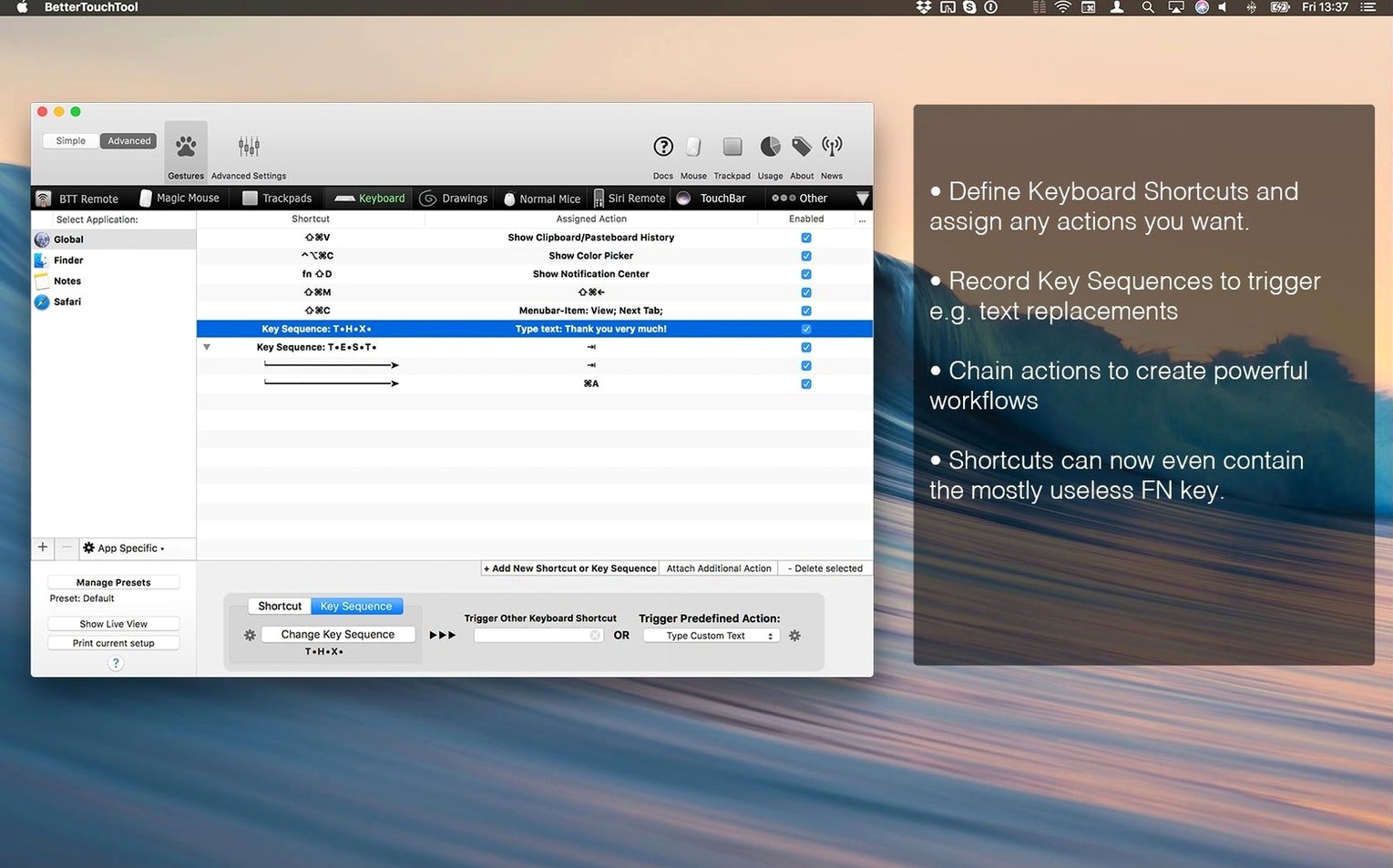
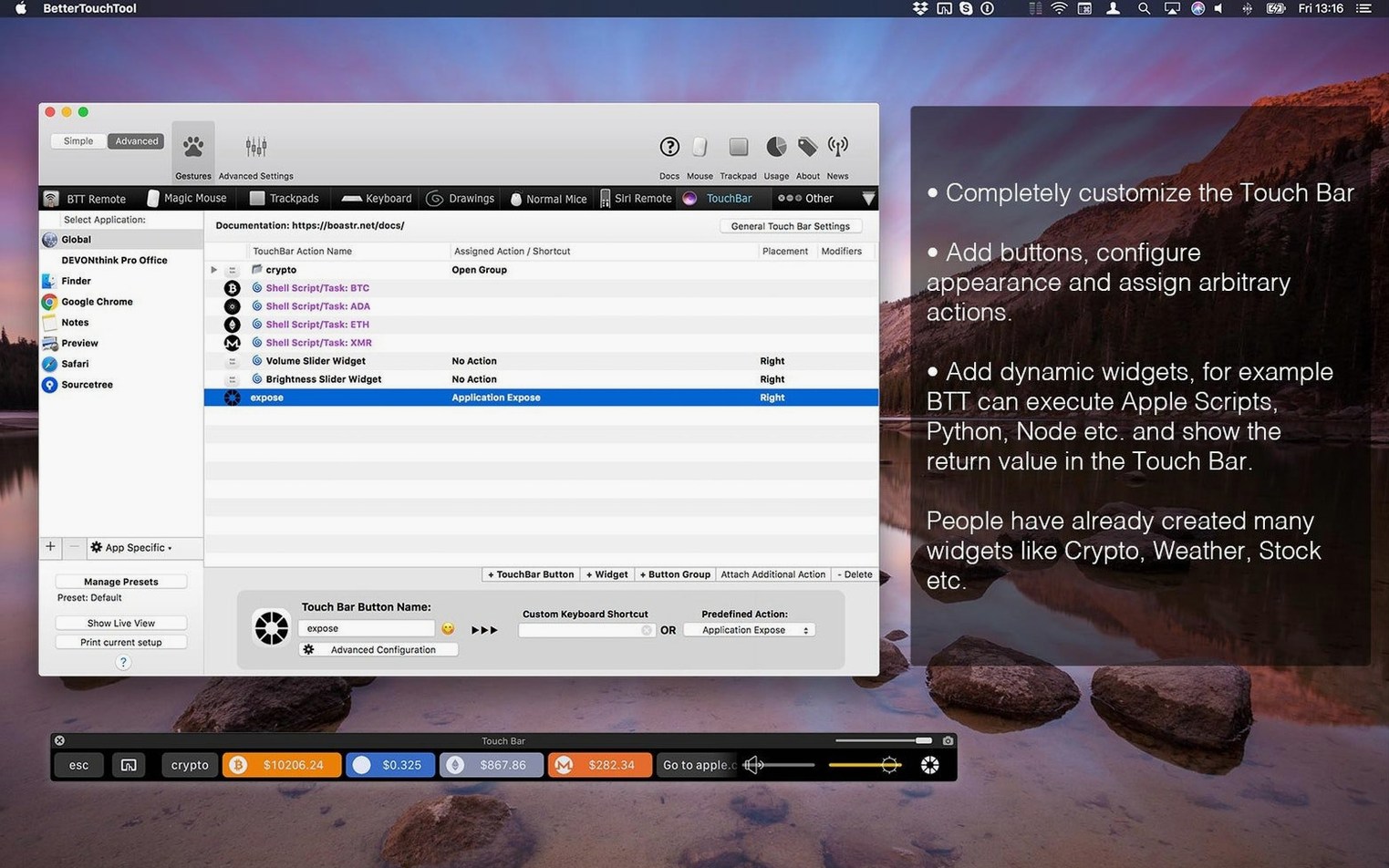
BetterTouchTool sits next to the apps you already use, intercepting input and mapping it to actions. You can assign keyboard shortcuts, build custom gestures, or draw shapes on the trackpad to trigger specific commands. It handles the Touch Bar too, letting you add widgets that display information or perform tasks. The built-in clipboard manager keeps track of multiple copied items, so you can paste something you copied minutes ago without losing your current clipboard.
Compatibility and setup
The app runs on both Apple Silicon and Intel Macs, requiring macOS 10.15 or later. It recognizes input from the trackpad, Magic Mouse, normal mouse, keyboard, Siri Remote, and Apple Remote. Installation is straightforward, and the package includes activation instructions.
BetterTouchTool has been around long enough that people know roughly what it does. The questions tend to be about the details: how it fits into a daily workflow, what the latest version actually changed, and whether specific hardware works. Here is what that looks like in practice.
Runs on macOS 10.15 or later with Intel or Apple Silicon
The app runs on any Mac that meets two requirements: macOS 10.15 or later, and either an Intel or Apple Silicon processor. It is a background utility, so it stays active after launch and intercepts input events before most apps see them. It does not replace system settings — it layers on top of them.
For trackpad users, BetterTouchTool recognizes the same multi-finger gestures macOS already handles, plus custom ones you define. The Magic Mouse gets the same treatment: swipe, tap, and click patterns can trigger different actions. Normal USB or Bluetooth mice work too, with gesture recognition for button combinations or movement patterns. The Touch Bar, if your Mac has one, becomes a programmable strip where you can place buttons, sliders, and widgets that display data from scripts or web services.
The Siri Remote and the older Apple Remote are both supported, which is useful if you use a Mac connected to a TV or projector. Keyboard shortcuts can be remapped globally or per application. The app includes a screenshot tool with basic image editing built in, and the clipboard manager tracks a history of copied items so you do not lose something when you copy the next thing.
Sets up rules while working between browser, code editor, and messaging app
Imagine you are in the middle of a workday. You have a browser, a code editor, and a messaging app open. BetterTouchTool sits in the menu bar, running in the background. You have set up a few rules over time, and they fire automatically when needed.
You switch to the browser and do a three-finger swipe up on the trackpad. Instead of Mission Control, that gesture triggers a custom keyboard shortcut that opens a new tab. You set that up earlier because you open tabs more often than you check Mission Control. In the code editor, a different rule applies: a two-finger tap on the right side of the trackpad runs a search for the selected text. That mapping only works inside the editor, because you assigned it to that specific application.
Later, you copy a block of text, then copy a link, then copy an image reference. The clipboard manager stores all three. When you need the text again, you access the history, pick the entry, and paste it without switching contexts. You take a screenshot of a window, and the built-in editor lets you add an arrow and a note before saving it. You do not open Preview or another app for that.
If your Mac has a Touch Bar, you might have a custom widget that shows the current time in a second time zone, or a button that runs an AppleScript to rename a batch of files. These widgets are created with AppleScript, custom URL schemes, or HTTP requests, and they update dynamically.
Maintenance release that continues to work as expected
Version 6.726 is a maintenance release. It does not add a new input device or a major feature. The developer lists it as the current stable build. For everyday use, this means the app continues to work as expected on the latest macOS versions and on the current Apple Silicon and Intel hardware. If you were using an earlier version from 2023 or early 2024, the update ensures compatibility with recent system updates and fixes any smaller bugs that accumulated.
New users installing 6.726 get the same interface and feature set as someone who upgraded from the previous version. The clipboard manager, screenshot tool, gesture recognition, and Touch Bar widgets all behave the same way. The difference is that the app is tested against the software environment you are likely running today, so there is less chance of a conflict or a broken gesture mapping after a macOS update.
If you are already using BetterTouchTool, updating to 6.726 is the safe choice. If you are setting it up for the first time, you are starting on the current build.
Compatibility and installation concerns before installing
Can override macOS gestures if you map the same gesture twice
It can, if you map the same gesture twice. By default, BetterTouchTool lets you set actions for gestures that macOS already handles. If you assign a three-finger swipe up to something other than Mission Control, the system gesture stops working in that context. You can also leave system gestures alone and only add new ones. The app does not force any overrides — it gives you the option.
Works with standard mice using button combinations and movement patterns
Yes. BetterTouchTool supports normal mice in addition to the Magic Mouse. For regular mice, gesture recognition works with button combinations and movement patterns rather than surface swipes. You can set up actions for middle-click, side buttons, or holding a button while moving the mouse in a direction.
Is the clipboard manager always running?
It is part of BetterTouchTool and activates when the app is running. You can access the clipboard history through a menu bar icon or a keyboard shortcut you define. The history persists until you clear it or restart the Mac, depending on your settings. The app does not save clipboard contents to disk unless you configure it to.
Does the screenshot tool replace dedicated apps?
It covers basic needs: capturing a selection, a window, or the full screen, and editing on the fly with arrows, text, and shapes. If you need layers, color adjustments, or annotations that require more than a few clicks, you will still reach for something else. For quick captures and markup, it works fine.
How do I set up different rules for different apps?
BetterTouchTool lets you assign a mapping to a specific application or to all applications. When you create a new shortcut or gesture, you choose the target app from a list. If you leave it as global, the action applies everywhere. If you assign it to, say, Safari, it only fires when Safari is active. That is how you keep gestures from conflicting across different tools.
Works with Siri Remote when paired to a Mac, not an Apple TV
It works with the Siri Remote when the remote is paired to a Mac, not to an Apple TV. The app recognizes the remote's touch surface, buttons, and motion. If you use a Mac connected to a television, the remote becomes a usable input device for controlling media playback or triggering shortcuts. The older Apple Remote works the same way.
- Version 6.726 is the latest release.
- macOS 10.15 or later
- Apple Silicon or Intel
Questions from the notes
Does BetterTouchTool work on Apple Silicon Macs?
Yes, BetterTouchTool supports both ARM and x86 64-bit Macs, so it runs natively on Apple Silicon and Intel models.
What input devices does BetterTouchTool support?
It supports trackpad, Magic Mouse, normal mouse, keyboard, Siri Remote, and Apple Remote, along with the Touch Bar.
Install procedure
- Download and open the package.
- Follow the installation and activation instructions included inside the package.
Reports from players
Sign in or create a tester account to file a report.
No reports filed yet.