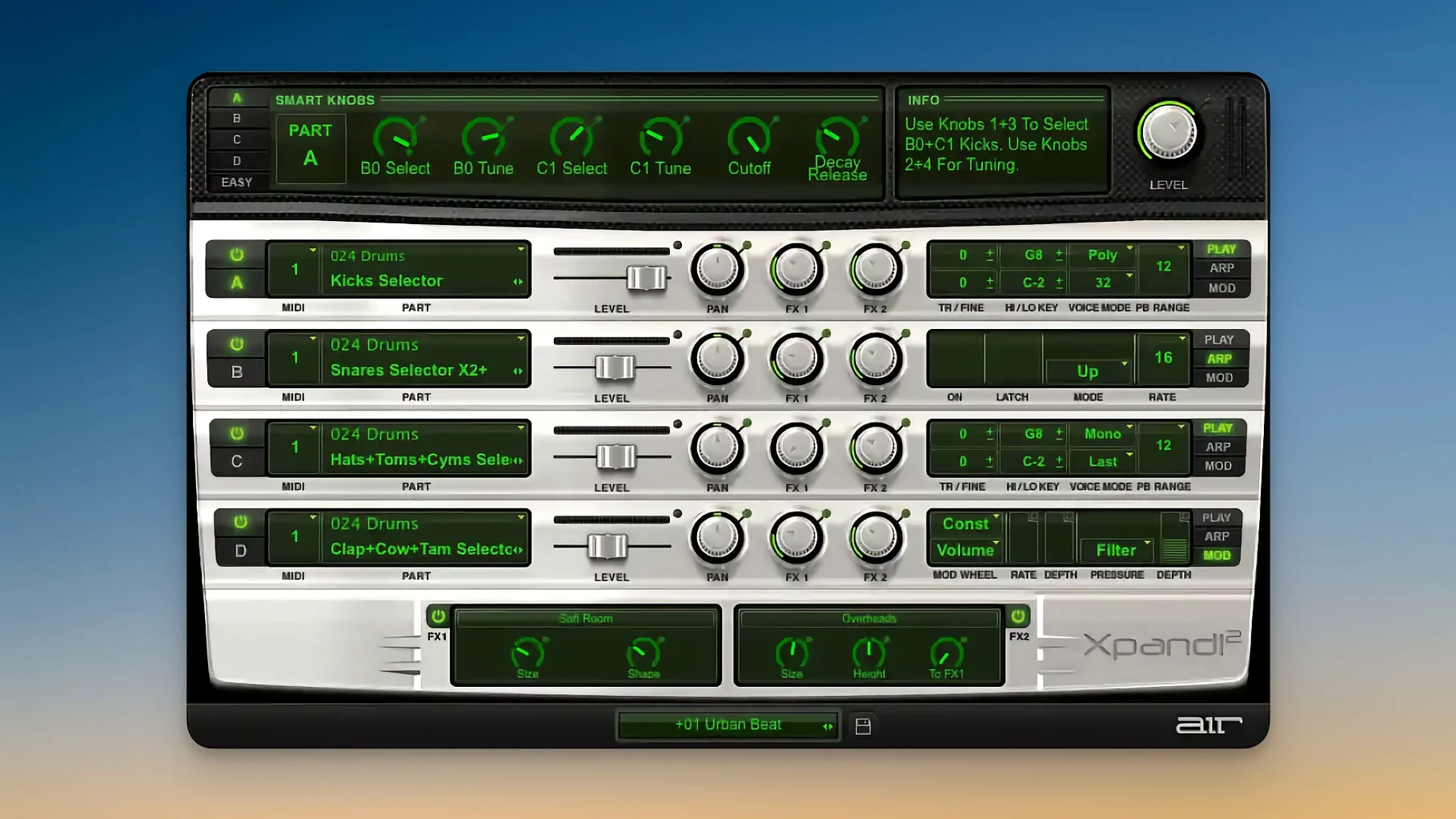
Xpand!2 is a multitimbral virtual instrument plugin that lets you stack four independent parts in a single patch, each on its own MIDI channel.
Dial in a layered sound
Each of the four slots can run polyphonic (up to 64 voices) or monophonic, with a priority rule — First, Last, Highest, or Lowest — for how mono parts handle note-on conflicts. Six smart controls let you tweak the blend without diving into individual synth engines.
Shape the tone with synthesis and effects
It draws from subtractive, FM, wavetable, and sample playback engines. On top of that, 50 effects — reverb, delay, chorus, Chaos Delay, and the rest — are available per part or globally. Pitch Bend, Aftertouch, and MIDI Learn map to whatever you want to automate.
Browse presets by category
More than 2,500 presets live in 29 categories. Originally part of the Creative Collection for Pro Tools, the preset library covers everything from keys and pads to percussion and soundscapes.
Tweak MIDI channel assignment first
Out of the box, Xpand!2 loads with its default preset and a few global settings that make sense for a general-purpose start. A couple of tweaks will get it closer to your workflow faster.
Start with the MIDI channel assignment for each of the four slots. By default, every slot listens on channel 1, which means all four parts play at once if you press a single key. If you want to layer sounds, that's fine. But if you plan to split parts across tracks or a keyboard controller, set each slot to a separate channel — 1 through 4 is the obvious layout. The MIDI Learn feature can map any physical controller to any slot parameter, so you can bypass the mouse for smart controls or effects sends.
The voice mode for each slot matters early. Polyphonic mode works well for pads, strings, or any sound that needs chord support. For leads, basses, or percussive hits, switch to monophonic and pick a priority rule. Last-note priority is common for legato leads, while Highest works for fast runs where you want the top note to cut through. The change is per-slot, so a single patch can mix a polyphonic pad with a monophonic bass line.
If you load a preset and the sound is too busy, the six smart controls are the quickest way to tame it. They map to the most expressive parameters across all four slots — filter cutoff, resonance, envelope, and a few others — without needing to open each slot's individual editor. Pulling a single slider can thin out a dense layered patch for live playing or push it forward for a mix.
Native Apple Silicon support in the latest build
The current build, version 2.3.1, is a maintenance update. The most visible change for regular use is improved compatibility with Apple Silicon natively — no Rosetta translation layer needed. If you are running macOS 13 or later, the plugin loads and scans presets without the extra setup that earlier versions required on ARM-based Macs.
Beyond the architecture shift, the update refines how the interface behaves on HiDPI and Retina displays. The scalable UI redraws cleanly at higher resolutions, so the text and knobs stay readable on a 4K monitor or a built-in MacBook screen without manual scaling tricks. The effect processors and the arpeggiator respond the same way they did in 2.3.0; no new effects were added, and no presets were removed.
For anyone jumping from an older version, the preset library remains at more than 2,500 entries across 29 categories. The MIDI Learn and Aftertouch routing work the same. The only practical difference is one fewer step at installation — the native Apple Silicon build means you do not have to toggle any compatibility modes or install separate bridge layers.
Common questions before installing Xpand!2
Does it run as a standalone app or only inside a DAW?
Xpand!2 is a plugin. It loads in any DAW that supports VST3, AU2, or AAX — Ableton Live, Logic Pro, Cubase, Pro Tools, and the rest. There is no standalone version. It uses the host's MIDI routing, so you need a track with a MIDI input and the plugin inserted on an instrument channel.
Works without Pro Tools in VST3 and AU2 formats
Yes. It was originally developed for the Creative Collection inside Pro Tools, but the current release is a general-purpose plugin. The AAX format works in Pro Tools, and the VST3 and AU2 versions work in any other compatible host. No Avid software is required.
Can I use all four slots on different MIDI channels from a single keyboard?
Yes, as long as your keyboard sends on different channels. Set your controller to transmit on channels 1 through 4, assign each Xpand!2 slot to match, and each slot responds to its own channel. If your keyboard sends all notes on one channel, you will need to split the MIDI stream in your DAW using a MIDI channel filter or a multi-out instrument rack.
How do the 50 effects compare to dedicated effect plugins?
The effects are serviceable for sound design and live performance. The reverbs and delays are usable for general-purpose processing — room, hall, ping-pong delay, and the Chaos Delay for unpredictable textures. They are not at the level of a dedicated convolution reverb or a high-end delay plugin, but they save CPU and routing effort when you want to process a part without sending it to an auxiliary track.
Where to place VST3, AU2, and AAX files
Xpand!2 behaves like a standard audio plugin. It appears in your DAW's plugin list after you place the files in the correct folders — VST3 goes into ~/Library/Audio/Plug-Ins/VST3, AU2 into ~/Library/Audio/Plug-Ins/Components, and AAX into ~/Library/Application Support/Avid/Audio/Plug-Ins. The installer typically handles this, but if you move things manually, those are the paths.
On macOS 13 and later, the plugin benefits from Apple Silicon's memory bandwidth and low-latency audio driver model — useful when you stack several instances in a project. Since it runs natively, it integrates with the system's audio driver (Core Audio, ASIO4ALL via Boot Camp is not relevant here) without extra configuration. The HiDPI support means the interface scales correctly on external displays and the MacBook's built-in panel, which is a relief for high-resolution setups.
If you use Apple's Logic Pro, the AU2 version slots into the instrument rack. The MIDI Learn feature can map to Logic's automation lanes or to a physical controller. For Ableton Live users, the VST3 version works with Live's MIDI routing and the arpeggiator per-slot can replace or complement Live's own arp device. Pro Tools users get the AAX version with full automation and surround routing — though Xpand!2 outputs stereo.
The plugin does not rely on any background service or iLok-style license manager. The activation is handled during installation. Once it is in place, it works offline with no phone-home checks. That makes it straightforward to move between machines or use in a studio setup without a constant internet connection.
Xpand!2 offers a vast library of sounds for music producers, and the xpand 2 mac free download works natively on Apple Silicon. The xpand torrent and xpand 2 mac torrent variants point to the same package — a single installer that covers VST3, AU2, and AAX formats.
- macOS 13 or later
- Apple Silicon (native)
- English interface
Install procedure
- Run the installer.
- Follow the activation steps included in the package.
Reports from players
Sign in or create a tester account to file a report.
No reports filed yet.