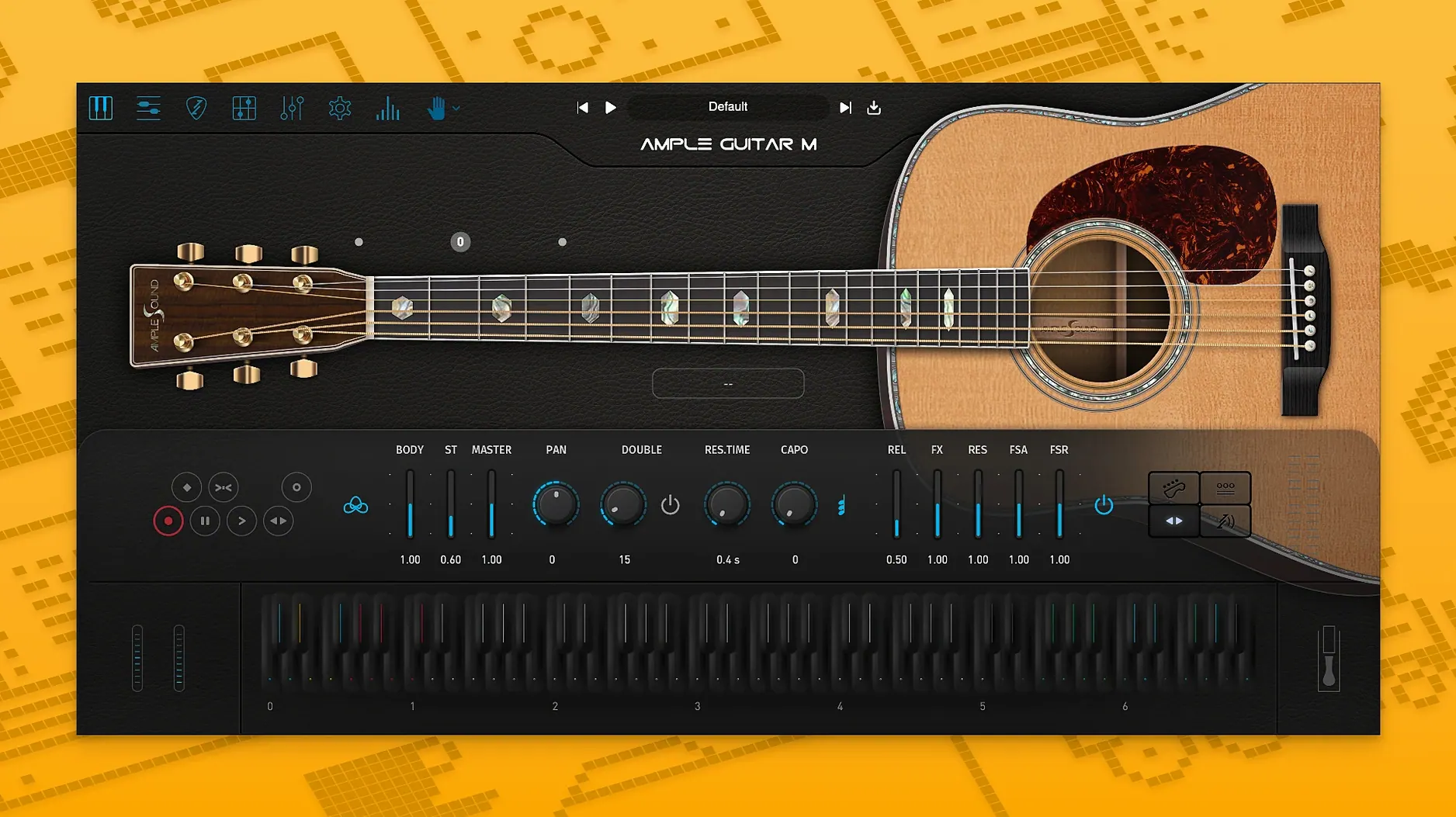
Ample Guitar M is a sample-based virtual instrument that models a Martin D-41 acoustic guitar with steel strings. It is used by composers and producers who need realistic fingerpicking, strumming, and articulation without recording a real guitarist.
macOS 10.13 and later, with a separate sample library
Ample Guitar M supports macOS 10.13 and later, on both Intel and Apple Silicon. The interface is in English. You will need to download the sample library separately from the developer's site; the plugin itself is just the engine.
Fingerpicking, strumming, and note-by-note articulations
The instrument includes fingerpicking, strumming, palm muting, hammer-ons, pull-offs, legato, slides, harmonics, and vibrato. It plays parts with fingering and articulations, which means you can shape a performance note by note. Version 4.1.0 adds improved sampler engine performance with faster loading and playback, plus Auto Vibrato Curve and Swing Quantization in the Riffer.
For a test-driven approach: check the system requirements, grab the installer and the sample library, and see if the loading speed meets your workflow. It works as a VST plugin on macOS, so your host needs to support that format.
Tweak the capo and a few settings to get a Martin D-41 sound
Once you have Ample Guitar M loaded and a MIDI track armed, the default patch might not sound like the Martin D-41 you expect. A few settings make the difference between a canned sample and a playable instrument.
- Capo position. Set this to match your song's key. It shifts the sample mapping so open strings ring correctly. Leave it at 0 for standard tuning, adjust if you want that open-string voicing in a different key.
- Strumming mode. The built-in strumming system defaults to a basic down-up pattern. Switch it to "Real" or "Auto" (the naming depends on the skin) to get velocity-dependent timing and muted strums between chords.
- Key switch range. Many articulations like harmonics and palm muting are triggered by note velocity or key switches. Set your lowest velocity range (usually 0–30) to palm muting and the highest (100–127) to slap or harmonics. This keeps your MIDI controller's dynamics meaningful.
- Riffer quantize. Version 4.1.0 brought Swing Quantization to the Riffer. 0% sounds like a sequencer.
How its faster sampler engine compares with other Mac guitar plugins
Ample Guitar M vs. MusicLab RealGuitar
RealGuitar also targets acoustic guitar emulation, but it uses a pattern-based approach. You select a strumming style and it maps MIDI chords to pre-recorded phrases. Ample Guitar M gives you more direct control: you can edit individual fingerings in the tab player, assign different articulations per note, and load Guitar Pro files for exact parts. RealGuitar is easier to get a quick strum pattern, but Ample Guitar M is better for fingerpicking or transcribed solos.
Ample Guitar M vs. Native Instruments Session Guitarist
Session Guitarist relies on phrase-based loops for strumming and picking. It sounds polished out of the box but limits you to the included patterns. Ample Guitar M's tab player and Riffer let you write your own patterns or import existing tabs. If you need a specific chord progression with custom voicings, Ample Guitar M is the more flexible choice. Session Guitarist is lighter on system resources since it loads fewer samples per articulation.
Ample Guitar M vs. Orange Tree Samples Evolution Acoustic Guitar
Evolution Acoustic Guitar also models a steel-string acoustic and includes fret noise, slides, and multiple mic positions. Orange Tree's library is sample-heavy and sounds very detailed, but it lacks a built-in tab player or Guitar Pro import. Ample Guitar M wins for workflow if you work with tabs or need to program fingerings at the note level. Evolution Acoustic Guitar shines if you want a mix-ready tone from the start.
Load a MIDI track and the sample library plays in seconds
You open your DAW (Logic Pro, Cubase, or Studio One) and add a new MIDI track. The plugin loads in a few seconds—version 4.1.0's faster sampler engine means the sample-library is ready to play before you've set up the track routing. You draw a simple chord progression: G, C, Em, D. The default patch plays these as strummed chords, but they sound stiff because the velocity is uniform.
You open the Riffer tab and select a fingerpicking pattern from the presets. The Riffer maps it to your chord progression and adds slight timing variations from the Swing Quantization slider. You adjust the tempo from 120 BPM to 90 BPM to match a ballad feel. The strumming system's "Real" mode now plays downstrokes slightly delayed on the low E string, like a player's hand moving across the strings.
Next, you add a separate MIDI track for a solo. You use the key switches to swap between harmonics and slides. For the solo verse, you keep velocity between 60 and 80 for a clean tone; for the chorus, you push it above 100 to get a brighter attack with some pick noise. The tab player loads a Guitar Pro file for the solo part, and the fingering display shows you exactly where each note is played on the fretboard. You tweak a few legato transitions in the pattern editor—changing a pull-off to a slide—and the part sounds like a real guitarist's take.
You bounce the two tracks to audio.
Workflow: Program a fingerstyle ballade from scratch
- Create the chord track. Insert Ample Guitar M on a MIDI track. Draw in a chord progression: Cmaj7, Am7, Dm7, G7. Set the tempo to 80 BPM.
- Set up the strumming system. Switch the strumming mode to "Fingerpicking." Select a pattern that alternates between the root note and the chord's inner voices.
- Record the chord part. Play the chords on a MIDI keyboard or draw them in the piano roll. The strumming system plays the pattern automatically. If a chord has a different voicing than intended, edit the note positions in the Riffer's tab display.
- Create the melody track. Duplicate the Ample Guitar M track. Set the second instance to a solo patch (no strumming). Draw in a single-note melody line that fits over the chords.
- Add articulations. For the melody, insert key switches at the start of certain notes: a harmonic on the highest note of each phrase, a slide into the first note of the second phrase. Insert palm muting on the lower notes of the chord track to keep the bass clear.
- Humanize the timing. Select all notes in the melody track. Apply a 10% random velocity offset and a slight timing jitter (1–5 ticks) to avoid quantized feel. Use the Auto Vibrato Curve from version 4.1.0 on held notes—this adds a natural pitch wobble at the end of long notes.
- Bounce to audio. Export both tracks as audio files. The result is a complete fingerstyle ballade with separate chord and melody parts, no live guitarist needed.
- Improved sampler engine performance — faster loading and playback.
- Added Auto Vibrato Curve to Riffer.
- Added Swing Quantization to Riffer.
- macOS 10.13 or later
- Intel or Apple Silicon
- Sample library required
Install procedure
- Extract the archive or open the DMG.
- Open the PKG installer.
- Continue through the installation steps.
- Follow the included activation instructions.
Reports from players
Sign in or create a tester account to file a report.
No reports filed yet.