The fixed star catalog alone gives you something to dig into when you want to see how a natal chart lines up with the sky’s older markers. Astro Gold for Mac has always been about putting a full set of astrological tools into one window, and version 6.2.1 keeps that promise without adding much new noise. You get solar, lunar, and secondary progressions, transits, and symbolic and solar arc directions — all accessible from the same chart view. The medieval techniques sit alongside the modern ones, so you are not locked into one tradition.
Orb, aspect, and planet filters are all there, and they work the way you expect: set your tolerances once and the chart updates. Composite and Davison charts are included, which matters if you do relationship work. The interface stays in English, and the app runs on anything from macOS 10.13 up through the current releases. Intel and Apple Silicon both work — no separate build needed.
What stayed the same is the layout and the general feel. The 6.0 update was the big architectural shift; 6.2.1 refines that without changing the workflow. If you already know the app, you will find your settings where you left them. If you are new, the chart wheel and the table views are the two main places to start.
Saves chart files to the standard macOS user directory
Astro Gold lives on its own inside the Applications folder, but it does not ignore the rest of the system. The app writes to the standard macOS user directory for saved chart files, so you can find and back them up through Finder or Time Machine without digging into hidden folders. Export works to the clipboard or as images you can paste into notes, emails, or a report in another app — the data moves out as a graphic, not a proprietary format.
If you keep a calendar app open for appointments or transits, you can cross-reference manually: the ephemeris table shows daily positions, and you can copy those dates straight into your own schedule system. No sync, no plugin — just readable data that stays under your control. The disk image installs with a simple drag, so the app never touches system folders beyond the user space.
Square chart style shows aspects in a linear grid for traditional analysis
- Round and square chart styles toggle in the display settings. Round is the default for most users, but the square wheel shows aspects in a linear grid that some traditional astrologers prefer for house-by-house analysis.
- Chart styles with and without aspects let you strip the aspect lines for a cleaner print or when you want to check the planet placements alone before interpretation.
- Tropical and sidereal zodiac systems switch at the chart level, so you can compare the same birth data in both systems side by side without re-entering anything.
- Asteroids like Chiron and Proserpina appear in the planet selection list. They are not buried in a separate catalog — just checked on or off like any other body.
- Relocation charts require only a new location name or coordinates. The app recalculates the houses for the new place while keeping the original birth time and date intact.
Enter a name, birth date, time, and location to generate a chart
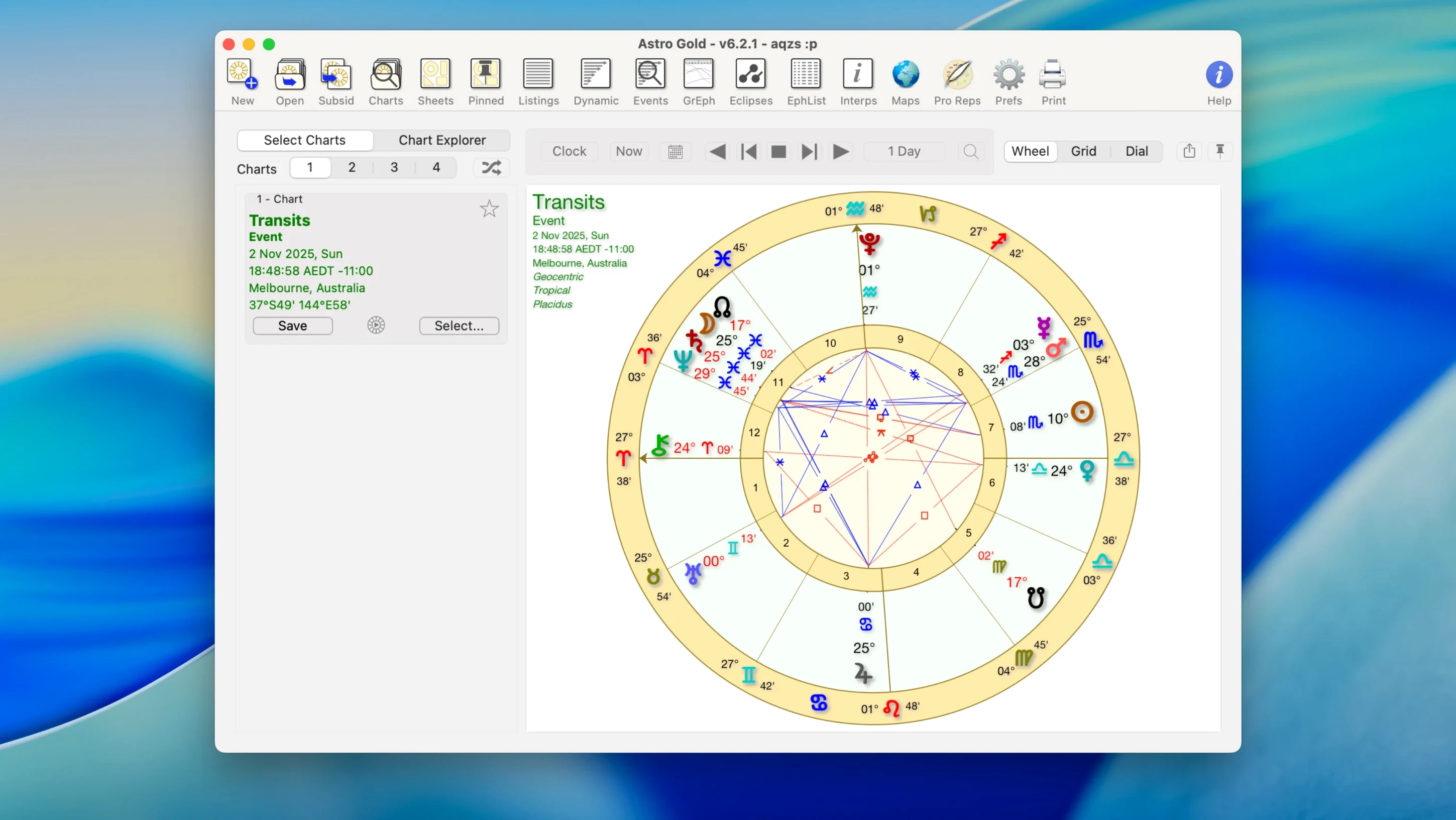
Open Launchpad, click Astro Gold. The main window shows a blank chart wheel. Enter a name, birth date, time, and location — the app pulls the coordinates from its internal gazetteer, but you can also type latitude and longitude directly. The natal chart draws in under a second on any recent Mac. From there, I usually add transits for today: one click, and the outer wheel overlays the current planet positions onto the natal houses.
If I want progressions, I set the secondary progression date to, say, age 30 for a friend born in 1994. The chart updates, and I can toggle the aspect filter to hide minor aspects and focus only on the conjunctions and oppositions. That cleaned-up view goes to the clipboard, then into a text document for the report. Later, I open a second chart for synastry — same person, but this time I load their partner's data. The synastry overlay shows the aspect lines between the two sets of planets, and I adjust the orb filter to 8° for exact conjunctions only.
Runs natively on ARM and Intel without a compatibility layer
Solar Fire for Mac (when it runs) covers similar ground with medieval techniques and fixed stars, but it has not seen a major update since before Apple Silicon. Astro Gold runs natively on ARM and Intel without a compatibility layer, so it behaves the same on a MacBook Air M2 as on an older iMac. iAstro offers a cleaner, more minimalist interface but skips progressions and fixed stars entirely — it is built for quick natal chart viewing, not deep analysis. Astro Gold sits in the middle: it does not try to be a teaching tool or a journal app, but it gives you the chart mechanics that most practicing astrologers need day to day. The asteroid catalog and the medieval technique set are what tilt the choice toward Astro Gold if your work goes beyond sun-sign charts.
- macOS 10.13 or later
- Intel or Apple Silicon
- Interface language: English
Install procedure
- Open the downloaded disk image.
- Drag the app into the Applications folder alias.
- Launch the app from Launchpad after the copy finishes.
Reports from players
Sign in or create a tester account to file a report.
No reports filed yet.