Native Instruments Massive X 2.0.0 — Mac build
VST Plugins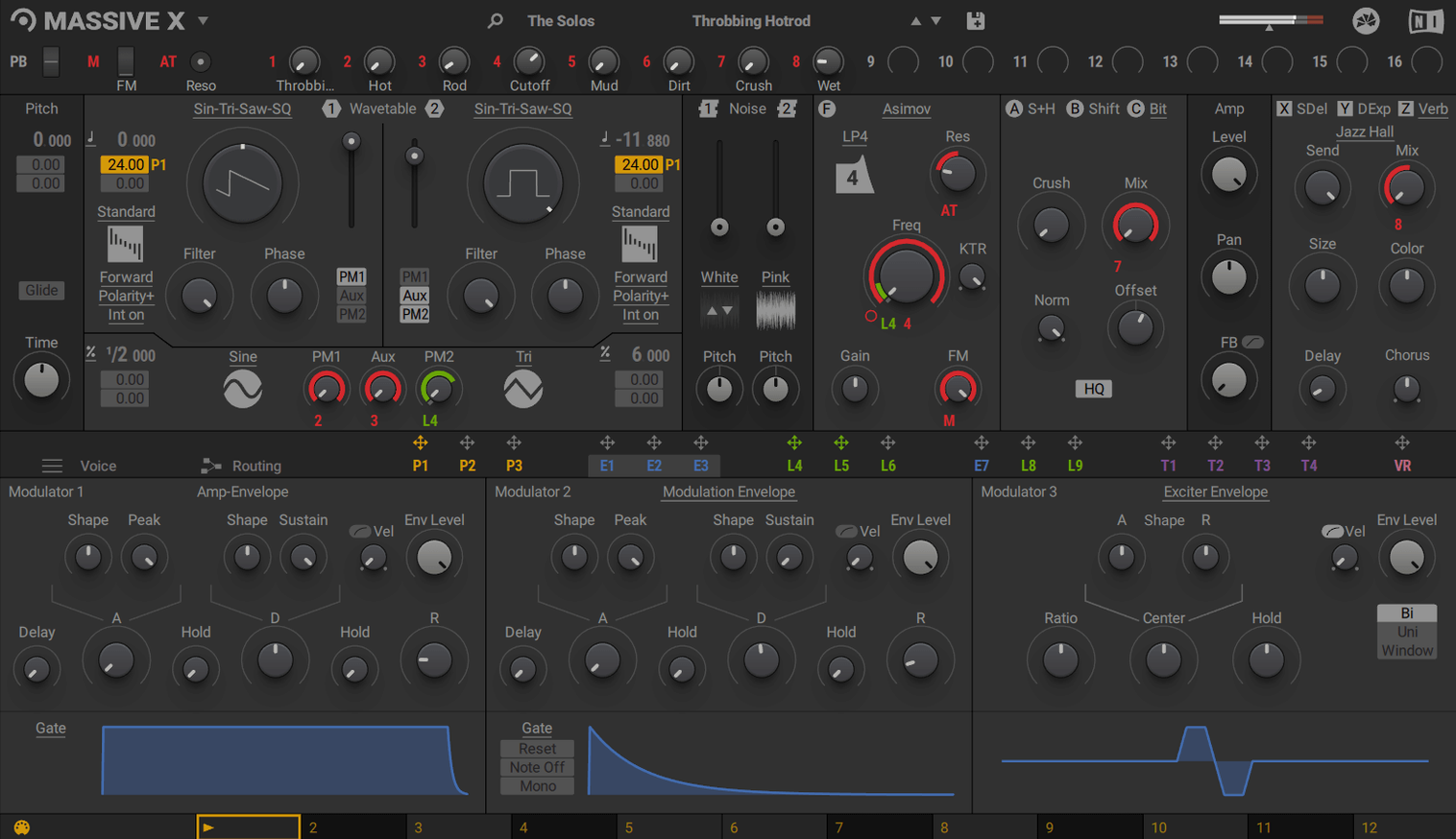
The routing panel is where Massive X earns its keep in a session. Any output can feed any input, so you can patch modulation sources to destinations that other synths keep locked down. That makes it a practical tool for sound design on buses and return tracks, not just as a lead or pad instrument.
- Drop it on a track as a VST, VST3, AU, or AAX instrument—whichever your DAW prefers.
- Use the 10 wavetable playback modes to shape evolving textures on a pad bus.
- Patch two phase modulation generators into filters or pitch for movement without extra LFOs.
- Dial in 780 factory presets as starting points, then re-route modulators to fit the mix.
- Run it as part of KOMPLETE for consistent integration with other NI instruments.
Massive X sits comfortably on a dedicated instrument track, but its strength shows when you route audio through it on a bus, processing external signals or layering with other sources. The flexible modulation keeps it useful beyond the preset browser.
Beginners often approach Massive X expecting a drop-in replacement for Massive. It is not. The routing is different, the oscillator section works differently, and the modulation system takes time to map out. The most common mistake is skipping the Performer section entirely. It looks like a step sequencer, so people treat it like one, but it is a modulation pattern drawer. Assigning a drawn pattern to filter cutoff or wavetable position changes the sound more than stacking extra oscillators ever will.
Another mistake is treating all 10 wavetable playback modes as interchangeable. They are not. Each mode changes how the wavetable scans, loops, and responds to modulation. Loading a single wavetable and cycling through modes without adjusting anything else can teach you more about the synth than browsing presets for an hour. Beginners tend to stay on the default mode and wonder why the synth sounds thin.
Phase modulation generators are easy to ignore because they sit outside the oscillator section. That is a mistake. Patching one into pitch or filter modulation produces the kind of instability that makes bass patches move. Relying only on filter envelope modulation leaves a lot of the synth unused.
People also forget that Massive X runs only inside a DAW. It has no standalone mode. That trips up users who want to use it as a live instrument without a host. You need a DAW, a VST host, or a plugin loader that supports AU or AAX to get sound out of it.
Massive X's wavetable engine sets it apart from Hive and Serum
Massive X operates in the same space as u-he Hive and Xfer Records Serum (via CrossOver or Windows VST hosts), but the differences matter more than the overlap. Hive offers a cleaner UI and a different wavetable engine, but its modulation routing is less flexible. Massive X lets you connect any output to any input, which Hive does not match. Serum has more wavetable import options and a larger user library, but it is not native on macOS 13 without a translation layer. Massive X runs natively on Apple Silicon and Intel, which saves the overhead of emulation.
Against Arturia Pigments, Massive X wins on routing depth but loses on visual feedback. Pigments shows modulation and routing graphically, which helps beginners see what is happening. Massive X requires you to follow the modulation lines in the routing panel to understand the signal path. Neither is better, but they suit different workflows.
For producers who already own Massive, Massive X coexists in the same DAW session without conflict. You can keep existing Massive patches and build new ones in Massive X. This makes the transition easier than switching to an entirely different synth ecosystem.
Mac specs: macOS 13 or later and AVX support required
Massive X requires macOS 13 or later and works on both Apple Silicon and Intel machines. Intel Macs need a CPU with AVX support, which covers most models from around 2013 onward. The installer asks for 4 GB of RAM as a minimum and recommends 6 GB. An internet connection is needed during installation and activation. The graphics card must support OpenGL 2.1 or higher, or DirectX 9 or 11. These are not demanding specifications for a modern synth plugin, but older Macs with integrated graphics that lack OpenGL 2.1 may fail the installation check.
The plugin ships in VST, VST3, AU, and AAX formats, so it fits into almost any Mac DAW. The installer is a standard disk image: mount it and run the installer. The activation is handled by the included crack from TEAM HCiSO, which means no Native Instruments account or Native Access tool is needed to run it.
The factory library includes 780 presets, which takes up space on disk. The wavetable library adds more. Expect a moderate install size, typical for a synth with this many waveforms and modulation options.
Seamless integration with KOMPLETE instruments and modulation routing
Massive X integrates with the KOMPLETE instrument line, which means it shares the same preset structure and routing philosophy as other Native Instruments plugins. If you use Kontakt or FM8, you already understand the modulation routing logic. The plugin also works as a VST3 instrument in Logic Pro, Ableton Live, Cubase, and any other host that supports the format. The AU and AAX options cover Pro Tools and older DAWs that prefer AU over VST.
On macOS, you can route audio from Massive X into other plugins or external hardware using the standard DAW routing. The synth does not expose any macOS-specific features like Apple Silicon optimizations beyond native compilation, but it does not need Rosetta 2 to run. That matters because it means lower overhead for real-time playback and less strain on the CPU compared to running it through emulation on an M-series Mac.
If you use Massive X as part of a sound design chain, you can bounce its output to audio and process it further in other tools. The flexible routing inside the synth means you can set up a modulation chain, bounce several passes, and layer them without reloading the plugin. This works well for building bass drops, risers, and ambient textures that would be tedious to program in a hardware synth.
The Performer section also pairs well with macOS MIDI tools. You can trigger patterns from a keyboard using the Remote Octave control, or draw patterns by hand. If you use a MIDI controller with aftertouch, you can route that into the modulation system as well, adding real-time expression to synthesized sounds. None of this requires additional software beyond the DAW and the plugin itself.
For producers who download massive x torrent or massive x torrent files, the installation process is the same as any other cracked NI plugin. The disk image mounts, you run the installer, and the activation is handled. No extra steps are needed beyond placing the plugin files in the correct VST folder for your DAW. The plugin works with all major Mac DAWs that support VST, VST3, AU, or AAX.
The 2.0.0 update is available now. A full list of changes is posted in the release notes on the Native Instruments community site.
- macOS 13 or later
- Apple Silicon or Intel 64-bit processor
Questions from the notes
What plugin formats does Massive X support on Mac?
Massive X is available as VST, VST3, AU, and AAX, so it works in most Mac DAWs.
Does Massive X work on Apple Silicon Macs?
Yes, Massive X runs on both Apple Silicon and Intel Macs, though Intel models need a processor with AVX support.
Install procedure
- Open the downloaded disk image.
- Run the standard installer.
Reports from players
Sign in or create a tester account to file a report.
No reports filed yet.