If you already own a drum trigger plugin, Snapback does something similar but narrower: it layers an additional sample onto each detected hit without needing to line anything up manually. Developed with BT, it’s a focused tool for adding attack, texture, or character to kicks, snares, and percussion.
| Detail | Value |
|---|---|
| Developer | Cableguys |
| Version | 1.1 |
| Format | VST 2, VST 3, AU, AAX |
| macOS | 10.13 or later (Intel & Apple Silicon) |
| Language | English |
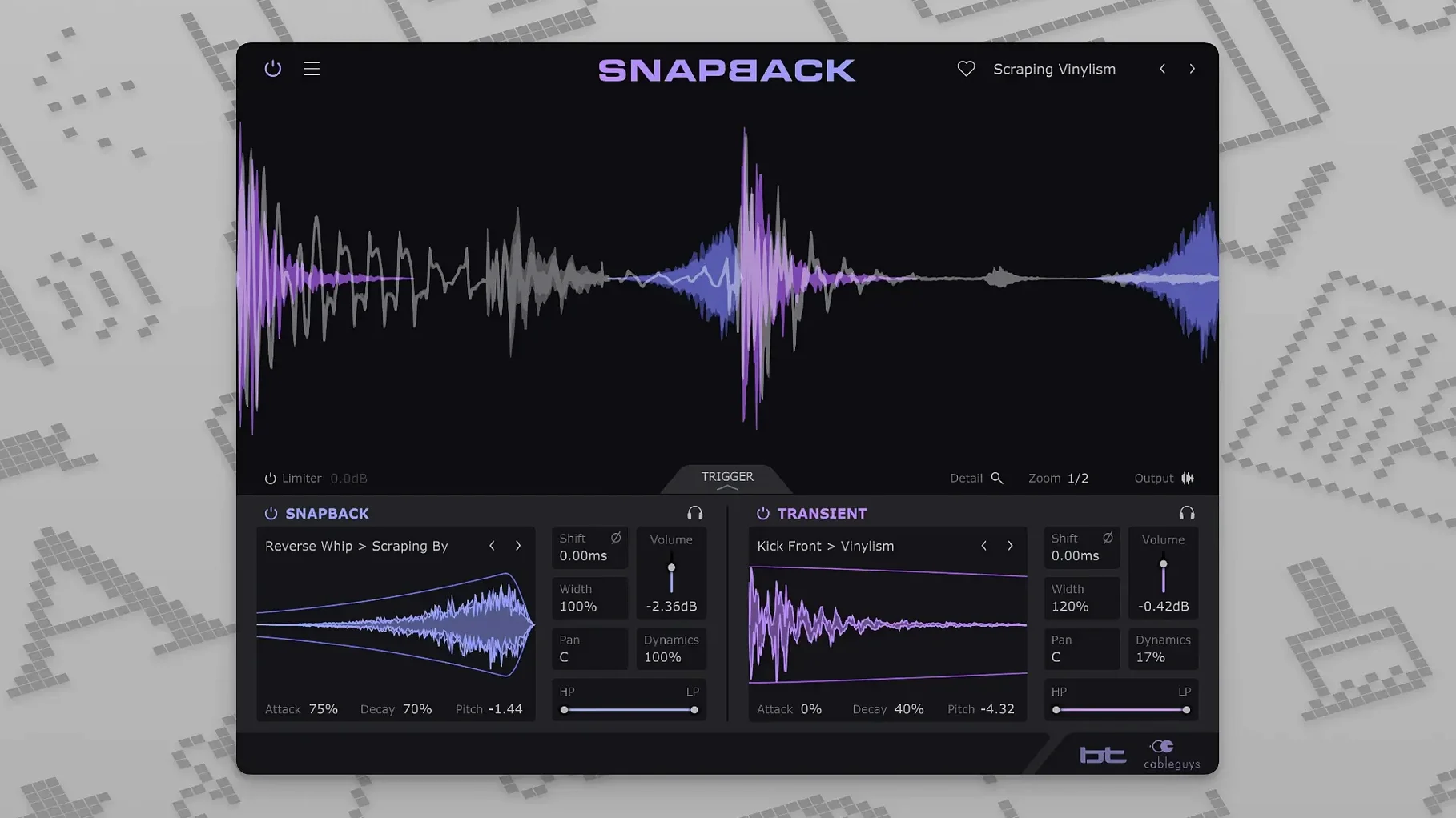
Snapback detects each drum hit and synchronizes the imported sample to it, with a waveform visualizer showing the alignment. The controls are straightforward: filters shape the layered sound, envelopes adjust attack and release, and a phase knob helps prevent cancellation with the original hit. The new Reverse button in 1.1 flips the sample for reversed percussive effects. MIDI port support jumped from 16 to 256, which matters if you’re routing multiple drum channels. It’s a drum layering plugin that does one thing cleanly — no extra fluff.
Places the layered sample slightly ahead of the detected hit
A few details in Snapback don't announce themselves but save time once you know they're there. The sample before transient option, for instance, lets you place the layered sample slightly ahead of the detected hit. This is useful when you want the attack of the added sample to hit exactly at the transient without any pre-delay. It's a single toggle, not a slider, so it's either on or off.
The included sample library of over 200 ready-made sounds covers the obvious categories: kicks, snares, percussion, and some texture layers. They're organized by type, not by BPM or key, so browsing is quick if you know what you want. The waveform visualizer updates in real time as you scroll through samples, showing you the transient shape before you commit to it. That preview saves a lot of back-and-forth auditioning.
The phase adjustment is a simple knob, not a multi-switch. You turn it until the summed sound thickens or thins, and the visualizer helps confirm you aren't accidentally canceling the original hit's low end. It's the kind of control that looks basic but handles most phase issues you'd encounter layering a kick or snare.
Pitch adjustment is semitone-based, not fine-tune cents. That matters if you want to match a sample to the key of a track — you shift it in whole steps, not micro-adjustments. For most drum layering work, that is enough; the intention is character, not tuning to a specific note.
Automates alignment for beatmakers building drum patterns from individual hits
Beatmakers building drum patterns from individual hits will find Snapback useful because it automates the alignment step. Instead of zooming in to snap a clap sample to a kick transient, you insert the plugin on the track and it does that work. Mix engineers layering a snare sample under a recorded snare get the same benefit — the sample locks to the recorded hit, so phase alignment is the only manual adjustment left.
EDM and pop producers who work with drum racks in Ableton Live or Logic Pro's drum maps will appreciate the expanded MIDI port support. With 256 addressable ports, you can route separate drum channels through multiple Snapback instances without running out of ports. That is less of an issue for someone with a single kick and snare track, but it matters when you have a full kit or multiple percussion layers.
Anyone who has ever spent ten minutes dragging a sample to line up with a transient and then given up because it still sounds slightly off is the exact user this plugin targets. It removes that friction entirely.
Workflow: layering a snare sample onto a recorded snare
- Insert Snapback on the snare track in your DAW. The plugin detects each snare hit automatically — no manual transient detection step.
- Browse the included samples or import your own using the user sample import. Select a snare or clap sample that has the tone you want to add.
- Check the waveform visualizer. The sample's transient should align with the original snare's transient. If it looks early or late, try the sample before transient toggle to shift the sample's timing slightly.
- Adjust the filter and envelope controls. A high-pass filter on the layered sample removes low-end mud. Shorten the attack envelope if the sample sounds too slow, or lengthen the release if it cuts off unnaturally.
- Turn the phase knob while listening to the snare in context. When the summed sound gets fuller or thinner, stop adjusting. The visualizer helps here — you want the waveforms to add positively, not cancel.
- If the sample sounds too high or low in pitch relative to the snare, use the pitch control. Semitone shifts are coarse, so a one-step adjustment is usually enough for a character change.
- Bypass the plugin and compare. The layered snare should have more attack or weight without losing the original hit's character. If it sounds disconnected, revisit the envelope or try a different sample.
Sample doesn't trigger on every hit due to transient strength
Sample doesn't trigger on every hit. The plugin detects hits based on transient strength. If a hit is very quiet or buried in the mix, the detector might miss it. Increase the input gain before Snapback, or adjust the hit sensitivity if your DAW exposes it through the plugin's UI. Some users find that a drum bus with heavy compression can mask quieter hits — try inserting Snapback before the compressor.
Layered sample sounds out of time. The sample before transient toggle is the first thing to check. If the sample starts exactly at the transient, it can sound sluggish. Enabling that option places the sample slightly earlier, restoring impact. The waveform visualizer shows the offset clearly — if the sample's transient appears after the detected hit's transient, toggle it on.
Phase cancellation makes the low end thinner. The phase knob is the fix, not EQ. Turn it while the kick or snare plays solo. When the sound gets fuller, you've found the right phase alignment. If the knob doesn't solve it, try a different sample — some samples have built-in phase issues with certain source hits that no single adjustment can fix.
MIDI port routing doesn't work as expected. Version 1.1 raised the port limit to 256, but your DAW must support multi-port MIDI output. In Ableton Live, you set the port number in the plugin's own control panel, not in Live's MIDI routing. In Logic Pro, the port assignment happens in the plugin window's settings. If the plugin still only responds to port 1, check that your DAW sends MIDI on the correct port number — many default to port 1 unless you configure otherwise.
The Cableguys Snapback plugin free download creates rhythmic echo effects ideal for modern music producers. Cableguys Snapback adds transient-shaping effects to your Mac DAW for punchier, cleaner audio.
- Added a Reverse button for flipping the layered sample.
- Expanded number of addressable MIDI ports from 16 to 256.
- macOS 10.13 or later
- Intel or Apple Silicon processor
- VST 2, VST 3, AU, or AAX host DAW
Questions from the notes
Does Snapback work on Apple Silicon Macs?
Yes, it supports both Intel and Apple Silicon Macs running macOS 10.13 or later.
Install procedure
- Run the installer package.
- Follow the on-screen instructions to complete installation.
Reports from players
Sign in or create a tester account to file a report.
No reports filed yet.